If you have been selling on Amazon for a while, you are probably familiar with its advertising solutions. Sponsored Brands is one of the advertising formats that helps sellers increase brand visibility and showcase their products to shoppers. Amazon has also introduced dynamic ASIN optimization for Sponsored Brands, giving eligible advertisers another way to match their products with relevant customer searches.
In this guide, we will explain how dynamic ASIN optimization works, its potential benefits, the key advertising features to understand, eligibility considerations, and the steps involved in setting up a Sponsored Brands campaign.
Understanding Amazon Sponsored Brands
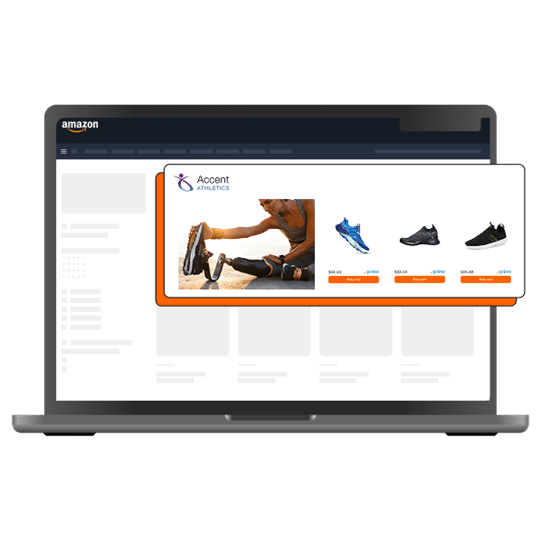
Sponsored Brands ads are designed to promote a brand and its product selection within Amazon’s shopping experience. Previously known as Headline Search Ads, this advertising format allows eligible advertisers to highlight their brand while directing shoppers toward relevant products or a dedicated landing page.
A typical Sponsored Brands ad includes three main elements:
- Brand logo: Helps shoppers recognize the brand behind the advertisement.
- Custom headline: Communicates the brand’s message or the value of its product selection.
- Featured products: Displays products relevant to the campaign and its advertising goals.
These ads can appear in prominent shopping placements, including Amazon search results, helping brands attract attention and introduce shoppers to their product ranges.
Sponsored Brands campaigns can be configured around selected keywords, with advertisers setting bids for customer clicks. This gives sellers control over their targeting strategy and how much they are willing to pay for advertising traffic.
Amazon has introduced various Sponsored Brands targeting features over time, including keyword-matching options and negative keyword controls. Dynamic ASIN optimization adds another layer by allowing Amazon to select products that may be more relevant to an individual shopper’s search.
Who Can Advertise With Sponsored Brands?
Sponsored Brands is generally available to eligible professional sellers enrolled in Amazon Brand Registry, as well as qualifying vendors, agencies, and other approved advertisers.
Eligibility depends on the advertiser’s account status, marketplace, and current Amazon advertising requirements. Before launching a campaign, sellers should confirm that their account and brand meet the applicable requirements.
How Does Dynamic ASIN Optimization Work?
Dynamic ASIN optimization helps advertisers show products that are more closely related to a customer’s search query. Instead of manually selecting individual products for every keyword or targeting group, an advertiser can choose an eligible landing page or Amazon Store and allow Amazon to select relevant products from that destination.
For example, imagine that your brand sells several types of kitchen accessories. A shopper searches for a particular kitchen product, while another searches for a different item from the same category. With dynamic optimization enabled, Amazon can select products from the campaign’s eligible product selection based on the context of each shopper’s search.
This approach can reduce the need to create numerous product-specific advertising variations. It also gives Amazon greater flexibility to match the products shown in an ad with a shopper’s interests.
Which Parts of a Sponsored Brands Ad Can Change Dynamically?
Dynamic ASIN optimization focuses on the product selection displayed in the ad. The brand logo and headline generally remain consistent, while the featured product slots can be populated dynamically according to the optimization settings.
This makes headline selection particularly important. Because different shoppers may see different products, the headline should describe the brand or product range broadly enough to remain relevant across multiple searches.
For example, a headline focused on a single product may not make sense when Amazon displays another item from the same Store. A more general headline that communicates the brand’s overall offering can work better in this situation.
Advertisers should also understand that dynamic optimization does not necessarily allow them to lock in one product and let Amazon select only the remaining products. The available selection method depends on the campaign setup and the optimization options offered in the advertising console.
When using this feature, advertisers give Amazon flexibility to choose relevant products from the eligible landing page or Store rather than controlling every featured ASIN manually.
How Does Amazon Determine Which ASINs to Display?
Product selection is intended to reflect the relationship between a shopper’s search and the products available to advertise. Amazon can consider different relevance signals when determining which products are suitable for an optimized Sponsored Brands ad.
Two important factors described in the original optimization approach include the following.
1. Product Performance Signals
Product engagement and sales performance can help identify items that attract customer interest. For example, products receiving more clicks or generating stronger sales on a landing page may provide useful performance signals.
However, historical performance alone does not guarantee that a particular ASIN will appear in every advertisement. The displayed products can vary according to relevance and the available campaign settings.
2. Search and Product Relevance
Amazon can also evaluate the relationship between customer search queries and product information. Product titles, descriptions, and other listing content help communicate what an item offers and which searches it may be relevant to.
When a shopper searches for a specific product type, Amazon aims to display products that match the search context rather than relying only on the advertiser’s manually selected default products.
For sellers, this makes accurate listing content and a well-organized Store important parts of the overall advertising strategy.
Important Sponsored Brands Keyword-Targeting Features
Sponsored Brands campaigns provide several ways to control which customer searches may trigger an advertisement. Keyword-targeting options can help advertisers reach shoppers who are likely to be interested in their products while limiting unnecessary clicks.
The original Sponsored Brands advertising updates highlighted three important concepts: variation matching, negative keywords, and broad-match modifiers.
The exact targeting options and their behavior may vary with Amazon’s current advertising interface and marketplace, so advertisers should review the settings available when creating a campaign.
1. Variation Matching
Broad keyword targeting can help ads reach shoppers who use related expressions instead of entering the exact keyword selected by the advertiser. Depending on the targeting rules, these searches may include relevant synonyms, plural forms, and other closely associated terms.
For example, a campaign targeting the keyword “heels” could potentially reach shoppers searching for related footwear terms, such as “women’s heels” or similar styles.
This approach can expand a campaign’s reach beyond the exact wording of its target keywords. It may help advertisers discover additional relevant search terms and introduce their products to shoppers who describe their needs differently.
However, broader matching can also generate clicks from shoppers whose intentions do not closely align with the advertised products. Regular search-term analysis is therefore important when evaluating performance.
2. Negative Keywords
Negative keywords help prevent advertisements from appearing for selected search terms. They are especially useful when certain queries are unlikely to generate relevant traffic or sales.
For example, if you sell premium women’s heels but receive clicks from searches associated with a footwear type you do not offer, suitable negative keywords may help reduce irrelevant exposure.
Depending on the options available for your campaign, negative targeting can be configured using different match types, such as phrase or exact matching.
The objective is to limit wasted advertising spend without excluding valuable searches. Advertisers should review customer search-term reports before adding negative keywords, ensuring that useful traffic is not blocked unnecessarily.
3. Broad-Match Modifiers
Broad-match modifiers were introduced as a way to require a particular term to appear in a shopper’s search before an ad could qualify for that search. In the historical example, adding a plus sign before a required word indicated that the term needed to be present.
For example, an advertiser targeting women’s footwear could use a keyword structure intended to require the word “women” in the search query.
This concept was designed to provide more control than unrestricted broad matching while retaining the ability to reach related searches.
Advertising interfaces and keyword-targeting rules can change over time. Sellers should therefore check Amazon’s current documentation rather than assume that legacy modifier syntax is available in every Sponsored Brands campaign.
Why Do These Targeting Features Matter?
Advertising costs can quickly add up when campaigns generate clicks without meaningful purchase intent. At the same time, targeting too narrowly may prevent a brand from reaching shoppers who are genuinely interested in its products.
Effective targeting requires a balance between relevant reach and cost control.
Variation matching can help advertisers discover related searches. Negative keywords can filter out unsuitable queries, while more restrictive targeting options can improve control over which shoppers see an advertisement.
Together, these approaches can help advertisers:
- Reach shoppers using different but relevant search terms.
- Reduce exposure to searches that do not match their product offering.
- Make more informed decisions about bids and advertising budgets.
- Identify new keyword opportunities through campaign performance data.
- Improve the relevance of traffic directed to their product listings or Store.
Dynamic ASIN optimization complements this process by adjusting the products shown in an ad according to contextual relevance. However, it does not eliminate the need to monitor targeting, bids, conversion rates, or advertising costs.
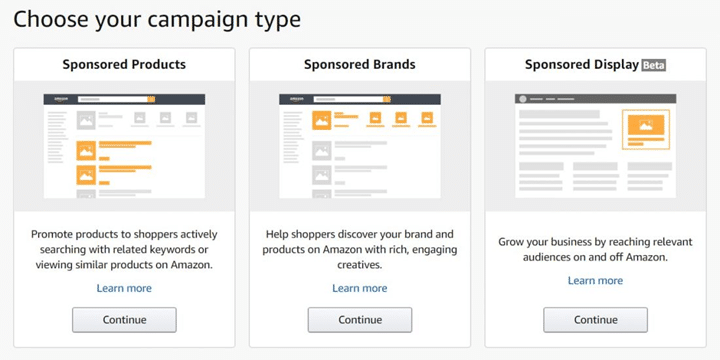
Sponsored Brands and Sponsored Products are separate advertising formats with different features and campaign structures. Advertisers should check the current campaign options for each format before assuming that an optimization feature is available across both.
Eligibility Requirements for Sponsored Brands
Before launching a Sponsored Brands campaign, advertisers should confirm that their accounts, brands, products, and selected marketplace meet Amazon’s current requirements.
Account Eligibility
Common eligibility considerations include:
- Having an eligible professional seller or vendor account.
- Meeting the applicable Amazon Brand Registry requirements where required.
- Maintaining an active account in good standing.
- Providing a valid payment method.
- Being able to fulfil orders in the marketplace being targeted.
- Having eligible product listings available for advertising.
The exact requirements may differ according to the advertiser type, country, and campaign format. Always check the requirements shown in the relevant Amazon advertising account.
Product Eligibility
Sponsored Brands has supported products from a broad range of categories, including electronics, home and kitchen, apparel, beauty, books, office supplies, toys and games, sports, automotive accessories, pet supplies, garden products, software, musical instruments, and other retail categories.
Eligibility is not universal. Certain product types, including some used, adult, or refurbished products, may be restricted. Supported categories and policy requirements can also differ between marketplaces.
Review the current category and product eligibility policies before adding ASINs to your campaign. Ensuring that advertised products comply with Amazon’s requirements can help prevent campaign rejection or delivery issues.
Sponsored Brands Campaign Limits
Advertisers should review the limits and options displayed in their current advertising console before planning campaign structures.
The historical campaign guidelines referenced the following limits:
| Campaign element | Historical limit |
| Ads per campaign | Up to 100 |
| Keywords per campaign | Up to 1,000 |
These figures reflect the limits described in the original guidance and should not be treated as a guarantee of current availability. Amazon may revise campaign capabilities, so confirm the applicable limits directly in your account.
Sponsored Brands Ad Moderation and Creative Guidelines
Sponsored Brands advertisements are subject to Amazon’s review process before they can begin delivering. Advertisers may receive an approval notification or a request to revise their creative if it does not comply with the applicable advertising policies.
The review period can vary. Although earlier guidance described reviews taking around 24 hours, some reviews may take longer. Check the status and notifications within your advertising account for the most accurate information.
Advertisements should accurately represent the brand and the products being promoted. Claims in headlines and other creative elements must be appropriate, supportable, and consistent with Amazon’s requirements.
Keep these creative guidelines in mind when preparing your campaign:
- Avoid unsupported superlatives: Terms such as “best,” “top-selling,” or “best-rated” may require evidence or may not be accepted in certain contexts.
- Proofread the headline: Check spelling, punctuation, grammar, and capitalization before submitting the ad.
- Use consistent capitalization: Avoid unnecessary all-capital text or unusual capitalization patterns.
- Include a clear brand identity: Use an appropriate brand logo so shoppers can recognize the advertiser.
- Write a relevant headline: Make sure the headline reflects the product range and remains suitable for the products that may appear dynamically.
- Check seasonal messaging: If the headline mentions an event or season, ensure that the message remains accurate for the campaign period.
- Follow creative policies: Review Amazon’s current creative acceptance requirements before submission.
A careful creative review helps reduce avoidable issues and ensures that the advertisement communicates the brand’s offering clearly.
How to Create an Amazon Sponsored Brands Campaign
Once your account and products are eligible, you can begin configuring a Sponsored Brands campaign. The exact interface may change, but the main steps generally involve selecting a campaign type, defining the budget and landing page, choosing products or optimization settings, and submitting the creative for review.
Step 1: Open Campaign Manager
Sign in to your Amazon advertising account and navigate to Campaign Manager. Select the option to create a new campaign, then choose Sponsored Brands if it is available for your account and marketplace.
Step 2: Configure the Campaign Settings
Enter the core settings required for your campaign.
Campaign name: Choose an internal name that will make the campaign easy to identify in reports. The name is primarily used for campaign management rather than as customer-facing ad copy.
Portfolio: If portfolios are available in your account, use them to organize related campaigns by brand, product category, advertising objective, or budget group.
Start and end dates: Decide when the campaign should begin and whether it should run continuously or stop on a specified date. Review the scheduling settings carefully to ensure that the campaign matches your advertising plan.
Budget: Set a daily or other available budget that aligns with your spending goals. Consider your expected traffic, product margins, and campaign objectives before choosing an amount.
Brand: Select the eligible brand associated with the products being advertised. Sponsored Brands campaigns generally require consistency across the brand identity and advertised products.
Landing page: Choose an eligible destination, such as a product collection or Amazon Store, according to the options available in your campaign setup. If you select a Store, check that the relevant products are included and that the page offers a useful shopping experience.
Step 3: Select Products or Configure Dynamic ASIN Optimization
Choose the products that you want to advertise, or enable dynamic ASIN optimization if the feature is available and suitable for the campaign.
In manually selected campaigns, advertisers control the featured products within the permitted campaign structure. When dynamic optimization is enabled, Amazon may select relevant products from the eligible destination based on its optimization logic.
Amazon’s historical guidance recommended choosing products from the same category or products that share related keywords. This can help keep the advertisement relevant to a clear shopping intent.
Even when using dynamic selection, ensure that your landing page or Store contains appropriate products. If Amazon cannot identify a suitable match, the campaign may rely on its configured default products or follow the behavior defined by the current campaign settings.
Step 4: Prepare the Ad Creative
Add the brand logo and write a headline that accurately communicates the brand’s offering.
The original guidelines recommended a 400 × 400-pixel logo image under 1 MB. Check Amazon’s current creative specifications before uploading your logo, since requirements may change.
Pay particular attention to the headline when dynamic ASIN optimization is enabled. A flexible headline can remain relevant even when the featured products change according to the shopper’s search.
Review the creative as a whole to ensure that the message, logo, products, and destination work together.
Step 5: Set Bids and Choose Targeting
Configure the bidding and targeting settings offered for your campaign. Select relevant keywords or other available targeting options, and choose bids that fit your budget and advertising goals.
Use your product margins and historical performance as a starting point when deciding how much to bid. After launch, evaluate impressions, clicks, conversions, advertising cost of sales, and other relevant metrics to determine whether adjustments are necessary.
Do not rely exclusively on high traffic or click volume. The quality of that traffic and its ability to generate profitable sales are equally important.
Step 6: Review and Submit the Campaign
Before submitting the campaign, check every setting carefully. Confirm the advertised brand, products, landing page, headline, targeting, bids, and budget.
Submit the campaign for review and monitor its status through the advertising console. If Amazon requests changes, address the specific policy or creative issues identified in the notification.
Some campaign settings may become restricted after launch or approval. Review the editing options available in your account before assuming that every element can be changed later. If a particular setting cannot be edited, Amazon may require an alternative workflow, such as creating a new campaign.
Best Practices for Dynamic ASIN Optimization
Dynamic ASIN optimization can simplify product selection, but it works best when supported by a well-organized advertising strategy.
Maintain accurate product listings. Clear titles, useful descriptions, and relevant product information help communicate what each ASIN offers and can support better alignment between products and customer searches.
Build focused landing pages. Group related products together so the Store or landing page provides a coherent shopping experience. A focused destination can also make the campaign’s overall message clearer.
Use adaptable headlines. Avoid wording that refers exclusively to one product if the ad may display a range of items. Instead, emphasize the brand, product category, or shared benefit of the collection.
Monitor campaign performance. Review search terms, click-through rates, conversion rates, sales, and costs regularly. Use the data to identify irrelevant traffic, strong product combinations, and opportunities for refinement.
Check your budget and bids. Dynamic selection does not guarantee profitable results. Evaluate advertising spend against sales performance and product margins before increasing your investment.
Verify current Amazon requirements. Advertising features, account eligibility, campaign limits, and editing options can change. Use the current Ads console and official Amazon documentation as the final reference when setting up campaigns.
Conclusion
Dynamic ASIN optimization offers eligible Amazon advertisers a way to make Sponsored Brands campaigns more responsive to customer searches. Instead of relying entirely on manually selected products, sellers can allow Amazon to choose relevant ASINs from an eligible landing page or Store, while maintaining a consistent brand identity and headline.
To get the most from this approach, advertisers should combine relevant product selection with accurate listings, appropriate keyword targeting, thoughtful budget management, and regular performance reviews. Dynamic optimization can simplify campaign management, but ongoing analysis is still necessary to understand which searches and products contribute to meaningful business results.
Before launching a new campaign, review the current features and eligibility requirements in your Amazon advertising account. With a clear strategy and consistent monitoring, Sponsored Brands can form a useful part of a broader Amazon advertising plan.