Selling an Amazon FBA business is an exciting milestone. Seeing the payout land in your bank account feels unreal at first. But once the excitement settles, one critical concern comes up immediately: Can an Amazon seller account actually be transferred to someone else?
The reality is more complex than Amazon’s policy wording suggests. While Amazon clearly discourages the direct sale of seller accounts, thousands of business owners still complete successful ownership transitions every year.
The reason some transfers go smoothly while others fail is simple. Most sellers misunderstand what’s being transferred. You’re not handing over an Amazon account—you’re transferring a business that owns that account.
This distinction changes everything.
Think of it like business ownership in general. You don’t sell each individual asset separately; you sell the company, and the assets move with it. Amazon views ownership changes the same way. As long as the process is legitimate and documented, account ownership can shift without disruption—if done correctly.
This guide explains how to transfer ownership of an Amazon seller account in 2026, what Amazon actually allows, and where sellers tend to make costly mistakes.
TL;DR: Key Takeaways for Busy Sellers
Can you transfer an Amazon seller account?
Not directly. However, ownership can change through the sale of a legal business entity.
What matters most:
- Notify Amazon before making changes
- Update account information in a specific order
- Use a branded email domain
- Handle Brand Registry separately
- Plan a transition period of at least 14–30 days
- Keep IP and login behavior consistent
- Document every step of the transfer
Market snapshot (2026):
- Amazon FBA businesses sell for ~2.5x–4.5x annual profit
- Brand Registry can increase valuation by up to 1x
- Account health issues drastically reduce deal value
- Related account violations are the #1 transfer killer
There are two valid paths: selling the business entity or selling business assets. Which one applies depends entirely on how your business is structured.
Understanding Amazon’s Seller Account Transfer Policy
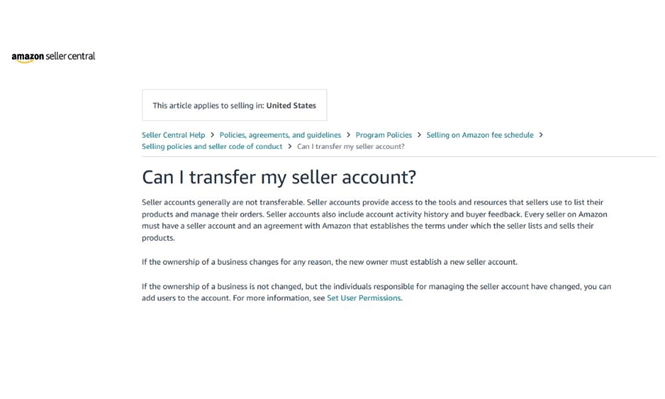
Amazon’s policy states that seller accounts are “generally not transferable.” That word generally carries more weight than most people realize.
Amazon does not allow people to simply sell or hand off accounts. However, legitimate business sales—where a legal entity changes ownership—are treated differently.
In Amazon’s eyes, a business and an account are linked. If the business remains intact, Amazon is far less concerned about who owns it.
The Key Difference Sellers Miss
Most sellers ask the wrong question. It’s not “Can I transfer my Amazon seller account?”
The real question is “Can I sell the business that owns the account?”
If you sell the legal entity itself, the Amazon account stays with that entity. Nothing is technically “transferred”—ownership of the business simply changes hands.
This distinction directly affects how clean and risk-free your exit will be.
Why Business Structure Matters
Your legal setup dictates your exit strategy:
- LLC or Corporation → Entity sale (simpler, safer)
- Sole Proprietor → Asset sale (more complex and risk-prone)
Sellers who establish proper legal entities early usually enjoy smoother exits. Those operating under personal names often discover these limitations only when it’s time to sell.
What Transfers—and What Doesn’t
When a legitimate ownership change occurs, the following can move with the business:
Transfers with the Business
- Product listings and ASINs
- Sales history and performance data
- Brand Registry access
- FBA inventory (entity sales only)
- Advertising campaigns
- Supplier relationships
Does Not Transfer Automatically
- Personal login credentials
- Personal tax IDs or SSNs
- Personal banking details
- Seller-specific feedback (in asset sales)
The transfer process differs drastically depending on the sale structure.
Two Ways to Transfer Ownership of an Amazon Seller Account
Method 1: Entity Sale (Best-Case Scenario)
This is the cleanest and most Amazon-friendly route. Instead of selling the Amazon account, you sell the company that owns it.
From Amazon’s perspective, the seller remains the same. The EIN, business registration, and seller agreement stay intact. Only the internal ownership changes.
How it works:
- Buyer purchases your LLC or corporation
- Ownership records change
- Amazon is notified of a legal ownership update
- Account details are updated gradually
- Operations continue without interruption
This approach preserves reviews, rankings, and account history.
Requirements:
- Active LLC or corporation
- Clean account health
- Matching trademarks and business records
- Organized financial documentation
Method 2: Asset Sale (More Complicated)
Asset sales occur when the seller cannot sell the entire business entity. Instead, individual assets—products, brand rights, inventory, SOPs—are transferred.
In this case, the buyer must:
- Open a new Amazon seller account
- Rebuild listings
- Transfer Brand Registry access
- Ship new inventory
- Establish fresh account performance data
This process increases risk and almost always involves downtime or reduced momentum.
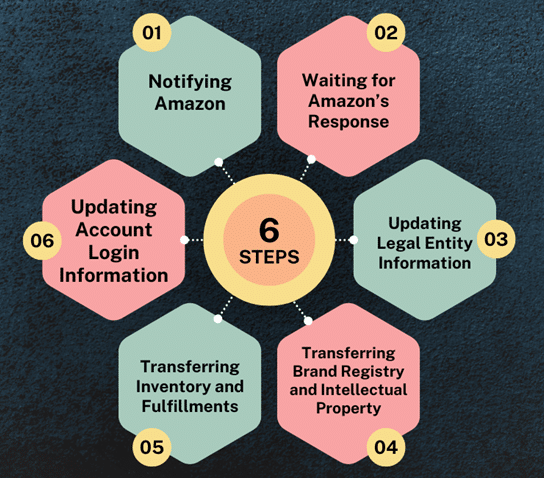
Step-by-Step: Entity Sale Transfer Process
Step 1: Inform Amazon First
Before changing any account details, notify Amazon Seller Support in writing. Sudden account changes raise red flags, while transparent communication builds trust.
The message should clearly state:
- Ownership has changed through a legal sale
- Business details will be updated accordingly
- Supporting documents are available
This creates a paper trail and significantly reduces suspension risk.
Step 2: Update Account Details in the Correct Order
The sequence matters. Incorrect timing can trigger automated security reviews.
Recommended order:
- Add buyer as admin user
- Change primary email (use branded domain)
- Update phone number
- Modify banking details (between payout cycles)
- Submit new tax documentation
Avoid mass updates in one session, and keep login behavior consistent.
Step 3: Transfer Brand Registry Separately
Brand Registry operates independently of Seller Central.
Process:
- Add buyer as Administrator and Rights Owner
- Buyer accepts access
- Seller removes themselves after confirmation
Trademark ownership must also transfer legally. Amazon cross-checks trademark records, so USPTO assignments should be filed during the sale process.
Step 4: Handle Inventory Correctly
Entity Sale:
Inventory stays exactly where it is. No removals, no relabeling, no disruption.
Asset Sale Options:
- Sell through existing stock while buyer prepares new inventory
- Remove inventory and reship (costly and slower)
Most sellers prefer a hybrid approach to minimize downtime and fees.
Step 5: Evaluation Period After Transfer
Buyers usually operate the business for a trial period before final payment is released.
Typical timelines:
- Small deals: 2–4 weeks
- Mid-range deals: 1–2 months
- Large exits: up to 90 days
During this window, buyers verify:
- Financial accuracy
- Inventory claims
- Supplier reliability
- Account health stability
Clear contractual boundaries prevent disputes caused by buyer-initiated changes.
Final Thoughts: Transferring an Amazon Seller Account the Right Way
An Amazon seller account isn’t transferred in isolation—it moves as part of a legitimate business transaction.
Sellers who succeed typically:
- Built proper business structures early
- Maintained clean records
- Planned their exit well in advance
- Communicated clearly with Amazon
- Used escrow and professional advisors
Ownership transfers take time. From initial negotiations to final payments, expect a process lasting anywhere from two to six months.
If your long-term goal is to sell, start acting like an owner today—not just a seller.