
Handling negative reviews is an inevitable part of selling on Amazon. No matter how great your product is, negative feedback will eventually appear.
Many sellers ask the same question: Can you delete a negative review on Amazon? And if yes, how should you handle unhappy customers? Let’s break it all down step by step.
When you sell products online, unhappy customers are part of the journey. Some of them will leave negative reviews, which can directly affect your sales and overall profitability.
Even if your listing has many positive reviews, shoppers usually scan the negative ones to understand potential issues. Whether you’re just starting out or have years of experience, this situation is something every Amazon seller faces at least once. In this guide, we’ll explain how to remove invalid negative reviews and improve customer experience on Amazon.
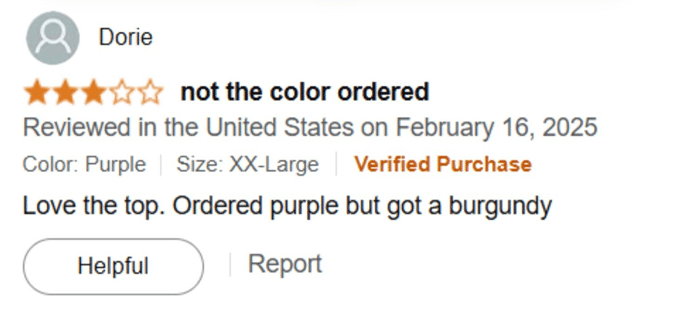
What the Numbers Reveal About Negative Reviews
Studies show that negative reviews on Amazon increased significantly during 2019–2020. Customer reviews play a major role in shaping buyer decisions and trust.
Without strong ratings and positive feedback, it becomes difficult for sellers to convert visitors into buyers. When customers compare similar products with comparable pricing, they almost always choose the one with higher ratings. The most common reason behind negative reviews is a poor customer experience with the product.
How to Handle Negative Amazon Reviews
There are two primary ways to deal with negative customer feedback:
- You can respond publicly to the customer’s review and try to resolve the issue.
- If the review violates Amazon’s policies, you can report it and request removal.
Let’s explore both options in detail.
Responding Directly to Negative Reviews
When replying to a negative review, keep these best practices in mind:
- Remain polite and professional at all times
- Clearly explain your side of the issue without being defensive
- Mention the steps you took—or will take—to resolve the problem
- Show empathy and demonstrate that customer satisfaction matters
- Invite the customer to contact you through Amazon’s buyer-seller messaging system for further assistance
Important: Never ask customers to contact you outside of Amazon. Sharing email addresses or phone numbers violates Amazon’s policies.
What Happens After You Respond?
Even after you reply, the negative review will still remain visible on your product listing. However, your response can reduce its impact by showing potential buyers that you actively support your customers.
In some cases, satisfied customers may voluntarily update or edit their review after receiving a resolution. That said, you should never ask them to change or remove their review, as this goes against Amazon’s rules.
Don’t Panic Over 1-Star or 2-Star Reviews
Receiving a low-rating review can feel stressful, but it’s important to stay calm and evaluate the situation logically. Ask yourself:
- Is the review from a real buyer or possibly a competitor?
- What specifically caused the customer’s dissatisfaction?
- Does the review violate Amazon’s review guidelines?
Answering these questions will help you decide whether to respond or report the review.
How to Comment on a Negative Review
To comment on a review, log into your Seller Central account and navigate to the product’s review section. Locate the review you want to respond to and click on “Add a comment.”
Make sure your response clearly identifies you as the seller and provides helpful information. Focus on offering value and reassurance to future shoppers.
Note: Vendors do not have access to buyer-seller messaging. Vendors can only direct customers to Amazon Customer Support for further assistance.
How to Delete a Bad Review on Amazon
Negative reviews can reduce conversions and sales, which is why invalid reviews should be addressed quickly.
Amazon may remove reviews that violate its policies, although approval isn’t guaranteed. You can report a review directly from the product detail page by clicking “Report abuse” under the review.
Alternatively, you can email Amazon’s support team with key information such as:
- ASIN
- Review date and time
- Reviewer name or pseudonym
- Direct link to the review
Reviews That Are Easier to Remove
Some reviews are easier to get removed than others. For example, reviews that contain offensive language, hate speech, or irrelevant content unrelated to the product can be flagged successfully.
If a customer’s review discusses topics unrelated to the product—such as shipping delays outside your control—or uses inappropriate language, Amazon is more likely to remove it after review.
Reporting Competitor Reviews
If you believe a negative review was posted by a competitor, you can report it to Amazon. However, Amazon requires solid proof before taking action.
Without clear evidence, the review is unlikely to be removed. Avoid mass-reporting all negative reviews, as this can backfire. Only report reviews that genuinely violate Amazon’s policies.
Handling Malicious Review Attacks
If you notice a sudden spike in negative reviews, your listing may be under a coordinated attack. In such cases, gather all relevant details and contact Amazon Seller Support immediately. Provide review links, dates, and patterns to help Amazon investigate the issue properly.
Understanding Amazon’s Review Removal Policy
A harsh review isn’t necessarily invalid. Many negative reviews are allowed as long as they follow Amazon’s guidelines.
Amazon may remove reviews that:
- Focus on the seller instead of the product
- Compare prices, availability, or alternative products
- Contain abusive, threatening, or harassing language
- Include obscene or inappropriate content
- Share personal contact details
- Promote other products, services, or websites
- Offer or request compensation
- Come from competitors
- Are repeated negative reviews from the same user on one product
Not All Negative Reviews Are Bad
Negative feedback can be valuable if used correctly. Often, it highlights issues you may have missed, such as unclear product descriptions or missing features.
You can use this feedback to optimize your listing, improve your product, and prevent similar issues in the future.
Stay Proactive With Review Management
If you manage multiple products, keeping track of reviews can become overwhelming. However, staying proactive is critical—especially for 1-star and 2-star reviews that can seriously impact rankings and sales.
Monitoring negative reviews regularly allows you to respond quickly, resolve issues, and maintain your product’s reputation. Selling on Amazon is a continuous learning process, and effective review management plays a key role in long-term success.