
Selling through Amazon’s Fulfillment by Amazon (FBA) program comes with many advantages, but it also comes with certain limitations sellers must understand. One of the most important is Amazon quantity limits, which control how much inventory sellers can send to Amazon fulfillment centers.
These restrictions can directly impact inventory planning, product launches, and overall business growth if not managed properly.
Back in 2020, Amazon introduced major inventory restrictions that significantly affected many FBA sellers. At that time, ASIN-level limits were capped at just 200 units, making it difficult for sellers to scale or launch new products efficiently.
In 2025, Amazon shifted away from ASIN-level restrictions and introduced storage-type inventory limits instead. This change grouped products into categories such as standard-size and oversize, each with its own storage capacity allowance.
While this update gave some sellers more flexibility, others experienced tighter storage limitations depending on their product mix and sales performance.
For every Amazon seller, understanding how these quantity limits work is essential for maintaining smooth operations and maximizing sales potential.
What Are Amazon FBA Quantity Limits?
Amazon FBA quantity limits are restrictions placed on how much inventory sellers can send into Amazon’s fulfillment network.
These limits exist because Amazon fulfillment centers are designed to move products quickly rather than act as long-term storage facilities. Although Amazon operates a massive global logistics network, storage space remains limited and must be allocated efficiently.
If your products sell consistently and maintain strong turnover, Amazon is more likely to increase your available storage capacity.
However, if products sit too long, move slowly, or create overstock issues, your Inventory Performance Index (IPI) score may drop, resulting in stricter restock limits.
What Are Amazon’s Current Inventory Limits in 2026?
As of 2026, Amazon continues to use storage-type-based restock limits rather than product-specific ASIN restrictions.
This means your inventory limits are determined by product storage classifications such as:
- Standard-size storage
- Oversize storage
- Apparel storage
- Footwear storage
- Hazardous goods storage
While this system provides flexibility for established sellers, it can create challenges for businesses looking to expand their catalog.
For example, imagine you sell multiple private-label products that collectively move 3,000 units each month.
If these items fall under the standard-size category and Amazon assigns you a 4,000-unit limit, you only have 1,000 units of available storage left.
This can make launching additional standard-size products difficult while also reducing your ability to stock up for high-demand periods like Q4.
It is also important to remember that Amazon counts both:
- Inventory currently available in fulfillment centers
- Inventory already shipped and in transit to fulfillment centers
If your combined inventory exceeds your assigned limit, you may be unable to create new shipments until stock levels decrease.
In some cases, Amazon may reject incoming shipments that exceed your allocated capacity.
This can disrupt sales momentum if not monitored carefully.
Where to Find Your Amazon FBA Quantity Limits
Checking your restock limits inside Seller Central is simple.
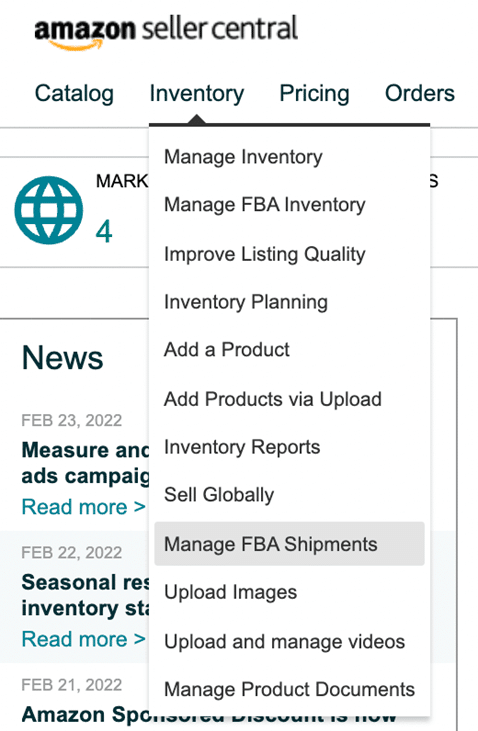
Navigate to Manage Inventory, then select Manage FBA Shipments.
At the bottom of the page, you’ll find two tabs:
- Restock Limits
- Storage Volume
Click the Restock Limits tab to view your current inventory allowances for each storage type.
Reviewing this section regularly helps sellers stay ahead of inventory restrictions and plan replenishment more effectively.
How to Handle Amazon Restock Limits
Improve Your IPI Score
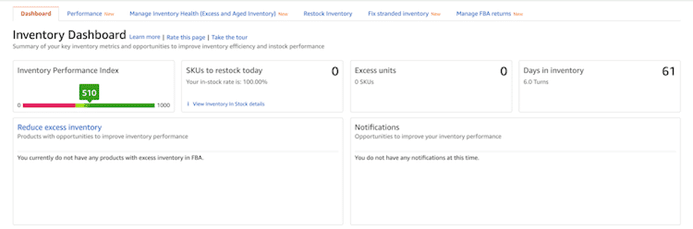
The most effective way to increase your inventory allowance is by improving your Inventory Performance Index score.
Amazon evaluates this score using several factors, including:
- Excess inventory levels
- Sell-through rate
- Stranded inventory
- In-stock performance
Sellers with stronger IPI scores typically receive higher storage limits based on historical sales performance and Amazon’s available fulfillment capacity.
Amazon updates IPI metrics weekly and recalculates storage allocations every quarter.
You can monitor your IPI score anytime through the Inventory Dashboard in Seller Central.
Consistently following Amazon’s recommendations can improve your score and unlock more storage flexibility.
Use Third-Party Fulfillment Services
Another effective solution is partnering with a third-party logistics provider (3PL).
A 3PL can hold your inventory outside Amazon while you replenish FBA stock strategically as storage space becomes available.
This approach prevents stockouts while avoiding excess storage restrictions.
It also gives sellers greater flexibility during seasonal spikes or product launches.
Automate Inventory Planning
Managing inventory manually becomes increasingly difficult as your product catalog grows.
Accurate forecasting helps prevent understocking and overstocking, both of which can negatively affect your IPI score.
Using professional inventory management software can streamline forecasting by analyzing historical sales trends and predicting reorder points more accurately.
This helps sellers maintain healthy inventory levels while staying within Amazon’s storage requirements.
Common Questions About Amazon Quantity Limits
What Is the Minimum Quantity for Amazon FBA?
Amazon does not require a minimum inventory amount for FBA shipments.
Sellers can send as little as one unit if needed, as long as they stay within their assigned restock limits.
How Can You Increase Storage Limits?
Improving your IPI score is the primary way to secure higher storage allowances.
Maintaining strong sell-through rates and reducing excess inventory can improve your storage eligibility over time.
How Does Amazon Determine Storage Limits?
Amazon calculates storage capacity based on several factors, including:
- Historical sales volume
- Seasonal demand trends
- Past IPI performance
- Fulfillment center capacity availability
These factors are reviewed regularly to adjust seller limits.
Will Amazon Change Inventory Limits Again?
Amazon’s inventory policies are always subject to change.
Sellers should monitor announcements in Seller Central for updates that may impact storage capacity or restock rules.
How Can Sellers Work Around Quantity Limits?
The best workaround is storing inventory externally through a warehouse or 3PL partner and replenishing Amazon stock strategically.
Sending inventory beyond your assigned limit may result in shipment rejection or additional overage fees.
When Do Amazon Quantity Limits Reset?
There is no fixed reset schedule.
Amazon reviews seller performance quarterly and adjusts limits based on updated sales activity, inventory turnover, and IPI performance.
Final Thoughts
Amazon quantity limits are a critical part of managing a successful FBA business in 2026.
While these restrictions can feel limiting, they are manageable with strong inventory planning, healthy sell-through rates, and consistent monitoring of your IPI score.
By staying proactive and optimizing inventory performance, sellers can avoid disruptions, maintain product availability, and continue scaling successfully on Amazon.