
As an Amazon seller, understanding FBA-related taxes is essential. Sales tax isn’t unique to online sellers—every retailer, whether small, large, digital, or physical, must deal with it. However, Amazon FBA sales tax can feel more complex due to multi-state inventory storage and varying tax rules. This guide simplifies the process so you can manage sales tax confidently.
What Is Sales Tax?
Sales tax is regulated by Washington D.C. and 45 U.S. states. The money collected contributes to public services such as education, infrastructure, parks, and social programs.
It functions as a pass-through tax, meaning you collect it from customers at checkout, but the money doesn’t belong to you. You simply hold it until it’s time to file and remit it to the state.
The Fundamentals of Sales Tax
Sales tax applies in Washington D.C. and all 45 sales-tax-imposing states. Every seller with tax obligations must charge customers accordingly.
You only keep the tax temporarily until filing deadlines—these may be monthly, quarterly, or annually depending on the state. Because states independently regulate sales tax, rules often differ, affecting rates between localities.
For example, shipping charges may be taxable in one state but exempt in another. Some states also require periodic renewal of sales tax permits.
Amazon FBA Sales Tax
Sellers must collect tax from customers in states where they have sales tax nexus. Nexus refers to a significant business connection within a state. While each state has unique rules, nexus generally forms through:
- Physical location: store, office, storage area, warehouse
- Home office: your residence counts as nexus
- Inventory stored in a state (including FBA inventory)
- Staff or contractors
- Affiliate relationships (click-through nexus)
- Drop-shipping activities
- Temporary selling events such as trade fairs
For FBA sellers, having inventory stored in Amazon warehouses creates nexus in most states—except Virginia.
How to Register for a Sales Tax Permit
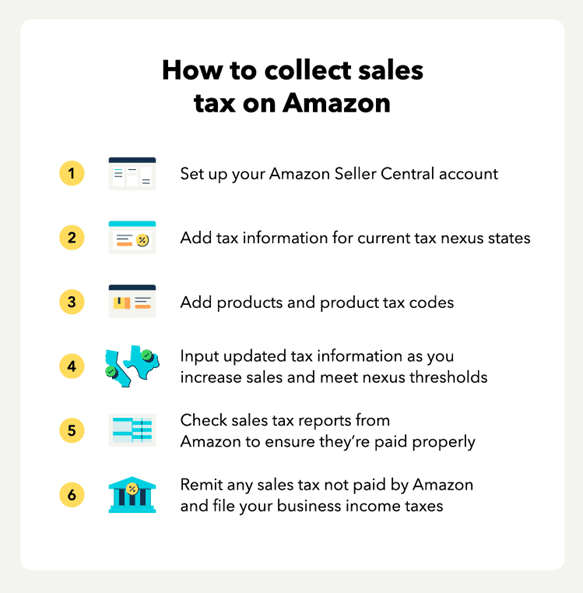
Before collecting tax in any state, you must register for a sales tax permit. Skipping this step can be considered unlawful. Amazon also requires you to have a permit before enabling tax collection.
Once approved, you’ll receive filing deadlines and the frequency schedule. To set up properly, many sellers use a sales tax calculator to estimate their obligations in each nexus state.
Depending on your sales volume, you may be required to file monthly, quarterly, or annually.
To register, you’ll need:
- Your EIN and business information
- The state’s Department of Revenue portal
- Access to the “Sales & Use Tax” section
- The required online registration link
When Do Amazon Sellers Need to Collect Sales Tax?
FBA sellers must collect tax when:
- They have nexus in the state
- Their product is taxable (physical goods/TPP)
- Their item generates notable sales volume
- The state considers the tax amount significant
- The state’s rules require collection on that type of product
Amazon’s tax engine automatically calculates accurate rates, considering details such as:
- Origin-based vs. destination-based states
- Rate changes
- Product-specific tax codes
Note: Amazon charges 2.9% per sales-tax transaction unless you choose to pay tax out of pocket.
Amazon FBA: Setting Up Sales Tax Collection
To configure tax settings in Seller Central:
- Log in to Seller Central.
- Go to Settings → Tax Settings.
- Choose View or Edit Tax Collection, Shipping & Handling, Giftwrap Settings.
Here, you select the states where you’ll collect tax. You can also manually enter rates, though this isn’t recommended since tax rates frequently change. You must enter your registration number before enabling collection.
Amazon FBA: Assigning a Product Tax Code
To apply product-specific tax rules:
Go to Seller Central → Settings → Tax → View Master Product Tax Codes & Rules.
Choose the tax code that best applies to your product category so that Amazon charges accurate sales tax.
States Participating in Amazon Tax Amnesty
Some states offer tax amnesty programs that help FBA sellers become compliant without penalties for prior unpaid taxes. These programs allow registration and tax collection moving forward without fear of back-tax consequences.
States currently offering amnesty include:
Arkansas, Alabama, Connecticut, Florida, Idaho, Kansas, Iowa, Kentucky, Louisiana, Missouri, Massachusetts, Minnesota, Nebraska, New Jersey, North Carolina, Rhode Island, Oklahoma, South Dakota, Texas, Tennessee, Utah, Washington DC, Vermont, Wisconsin.
If your business operates in a state not offering amnesty, consider professional guidance before registering.
Factors to Consider Before Collecting Sales Tax
Choosing when to begin tax collection requires careful evaluation. Registering too early may add costs before your sales justify it, while waiting too long can lead to penalties.
Important points:
- Very low-volume sellers may not need to collect right away.
- States can audit up to 10 years of unpaid tax.
- In non-amnesty states, registering late may result in a tax bill for past years.
- High unpaid taxes may lead to penalties or legal issues.
- If you experienced a sudden sales increase, you might consider a Voluntary Disclosure Agreement (VDA) before registering to limit past liabilities.
How to Become Tax Compliant
Once you confirm nexus and determine your product is taxable, register for a permit in that state. You must have the permit before collecting or remitting tax.
Your filing frequency—monthly, quarterly, or annually—depends on your sales volume.
Reporting and Filing Amazon FBA Tax
After you begin collecting tax, the state requires you to file returns showing:
- Total tax collected in the state
- Sales by city, county, and tax district
To get this information from Amazon:
- Log in to Seller Central.
- Go to Reports → Payments.
- Select Generate Date Range Report.
- Choose your filing period.
This lets you calculate the tax collected in each jurisdiction. Many sellers prefer automated tools to speed up tax reporting and consolidate data across marketplaces.
Once you have your totals:
- Log into the state’s tax authority website.
- Follow the online filing process.
- Submit your payment securely.
Even if you collected no tax during the period, you must still file a Zero Return. Some states also offer small discounts as a reward for filing and remitting tax on time.