
Are you exhausted from constantly checking competitor prices and manually updating your listings to stay competitive on Amazon?
Amazon’s automated pricing feature can simplify your pricing strategy and reduce the need for continuous monitoring. With this system, you can create pricing rules that automatically adjust your product prices based on competition, demand, and market shifts.
But how does this tool actually function—and how can you use it strategically to protect your margins while increasing sales?
In this comprehensive guide, we’ll break down how Amazon’s automated pricing works, its key features, advantages and drawbacks, and how you can apply it effectively to improve your overall pricing strategy.

What Is Amazon’s Automated Pricing?
Amazon’s automated pricing is a dynamic pricing system that uses algorithms to adjust product prices automatically within the Amazon marketplace. Instead of manually updating prices, sellers can set predefined rules that trigger price changes based on factors like competitor pricing, stock levels, demand trends, and Buy Box activity.
In addition to Amazon’s built-in repricing tool, there are also third-party repricers developed by external software companies. These tools often provide more advanced controls, deeper customization, and enhanced reporting features. However, they typically come at an additional cost. Later in this guide, we’ll compare Amazon’s built-in solution with third-party tools so you can understand the differences clearly.
Using automated pricing, sellers can either rely on Amazon’s preset rule types or create customized strategies. For instance, you can configure the system to lower your price when a competitor drops theirs, or raise it when demand increases and competition decreases.
While automated pricing can help you stay competitive and increase sales velocity, it also means prices may fluctuate frequently. This can sometimes feel unpredictable. That’s why monitoring your pricing rules regularly is still essential to ensure long-term profitability.
Amazon’s Built-In Tool vs Third-Party Repricers
There are several important differences between Amazon’s automated pricing feature and third-party repricing solutions:
Availability:
Amazon’s repricing tool is integrated directly into Seller Central and available to sellers by default. Third-party tools require external integration and setup.
Customization:
Amazon’s solution offers standard rule configurations such as competing against the Buy Box or lowest price. Third-party tools generally provide more flexibility, allowing sellers to create advanced rules based on competition, sales velocity, inventory, and profit thresholds.
Reporting & Analytics:
Amazon provides basic analytics and pricing summaries. Third-party solutions tend to offer more in-depth reporting dashboards and data insights.
Cost:
Amazon’s automated pricing is free to use. Most third-party repricers require a monthly subscription fee.
Ease of Use:
Amazon’s system is straightforward and user-friendly with minimal setup. Advanced repricers may require additional learning and configuration time.
How Does Amazon’s Automated Pricing Work?
Amazon’s automated pricing system uses predefined repricing rules to modify product prices in response to real-time marketplace conditions. Below are some of the primary rule types:
1. Competitive Buy Box Rule
This rule adjusts your price relative to the current Buy Box price. You can choose to price your product slightly below, equal to, or slightly above the Buy Box amount. This helps you remain competitive when multiple sellers are competing for visibility.
2. Competitive Lowest Price Rule
Instead of targeting the Buy Box, this rule focuses on the lowest available offer on a listing. You can match or undercut the lowest seller within the limits you define.
3. Competitive External Price Rule
This rule considers prices from other online marketplaces outside Amazon. Sellers can match or cap prices according to competitor listings on external platforms.
4. Sales-Based Rule (Sales Units)
With this rule, pricing adjustments depend on sales performance. If unit sales fall below a certain threshold, prices can automatically decrease to stimulate demand.
By combining these strategies, sellers can dynamically adapt to market changes and maintain a competitive edge.
How Much Does Amazon Automated Pricing Cost?
Amazon includes the automated pricing feature within its selling ecosystem without charging additional fees. Sellers using the professional plan can access the tool at no extra cost, making it highly appealing—especially for smaller sellers or those just starting out.
Because there is no added expense, sellers can experiment with automated pricing strategies without increasing their overhead.
How to Set Up Automated Pricing
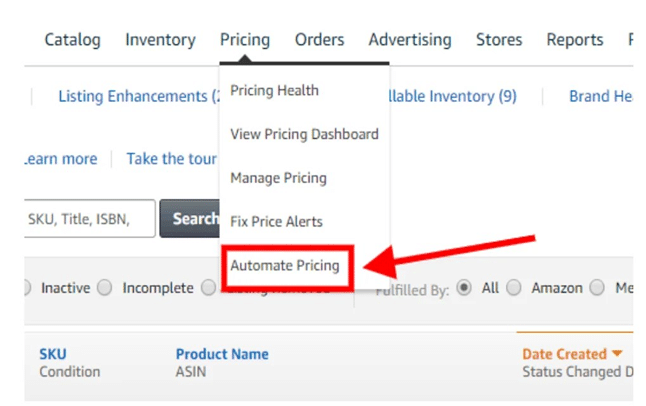
Setting up automated pricing inside Amazon Seller Central is relatively simple. Follow these steps:
- Log in to your Seller Central account.
- Navigate to the “Pricing” tab.
- Select “Automated Pricing.”
- Choose “Create a customized pricing rule.”
- Select your preferred rule type (e.g., Competitive Featured Offer or Sales-based rule).
- Name your pricing rule.
- Select applicable marketplaces.
- Define rule parameters, including minimum and maximum prices.
- Choose the SKUs to which the rule will apply.
- Review the settings and activate the rule by selecting “Start Repricing.”
Before activating automated pricing, it’s crucial to analyze competitor behavior, calculate your true costs, and define clear pricing objectives. Automation works best when supported by a strong pricing strategy.
How Long Does It Take to Activate?
Once a pricing rule is created and activated, changes usually reflect within minutes to a few hours. The exact timing depends on how frequently the system refreshes pricing data.
Keep in mind that Amazon’s marketplace is dynamic. Competitor price changes and algorithm adjustments continue to influence listing prices in real time. Therefore, ongoing monitoring remains necessary even when automation is enabled.
Pros of Amazon Automated Pricing
1. Saves Time
Automation removes the need for manual price tracking, freeing up time for product sourcing, marketing, and inventory management.
2. User-Friendly
The platform provides an intuitive interface along with clear summaries of pricing adjustments, making it accessible even for newer sellers.
3. Reduces Human Error
Manual pricing adjustments increase the risk of mistakes. Automated systems execute rule-based changes consistently and accurately.
4. Competitive Advantage
The system monitors competitor prices continuously and reacts instantly—something impossible to do manually 24/7.
Cons of Amazon Automated Pricing
1. Limits Premium Pricing Opportunities
Aggressive competitive pricing may prevent you from capitalizing on higher-margin opportunities if demand increases.
2. No Bulk SKU Rule Editing
Large inventories require SKU-by-SKU configuration, which can become time-consuming for sellers with broad catalogs.
3. Limited Fulfillment-Based Competition
The tool does not allow advanced multi-fulfillment competition logic (e.g., competing separately against FBA and FBM simultaneously).
4. Price Wars Can Occur
If competing sellers use identical repricing rules, prices may escalate or decline unpredictably. For example, two sellers both pricing $0.05 below competitors could create continuous adjustments until minimum thresholds are reached.
If you delete a pricing rule, automated adjustments for that SKU will stop immediately, and pricing must then be managed manually or reassigned to a new rule.
How Do You Qualify for Automated Pricing?
To use Amazon’s automated pricing, sellers must:
- Have active listings eligible for repricing.
- Set a minimum price for each SKU to protect profit margins.
- Select and apply a rule to each participating SKU.
- Maintain compliance with Amazon’s pricing policies.
Although a Professional account provides better scalability, an Individual account can still access automated pricing features.
Regular monitoring and optimization remain necessary even after qualification.
Final Thoughts
Amazon’s automated pricing is a valuable tool for sellers who want to stay competitive without constant manual adjustments. Its ease of use, cost efficiency, and rule-based control make it especially useful for small-to-medium sellers.
However, automation should not replace strategic oversight. Sellers must continue reviewing margins, monitoring competitors, and adjusting rules when necessary. When used wisely, automated pricing can strengthen your pricing strategy and help you succeed in Amazon’s highly competitive marketplace.