
Selling on Amazon can be highly profitable, but it comes with its fair share of operational hurdles. If you’ve been an Amazon seller for a while, you already know that inventory management and warehouse storage can become complicated and time-intensive over time so look up for long-term storage fees.
Adding to that challenge, Amazon applies long-term storage fees to products that stay in fulfillment centers without selling for extended periods.
These fees can slowly drain your margins and negatively impact your overall business performance.
That said, there’s no need to panic. This guide breaks down everything you need to know about Amazon’s long-term storage fees and outlines practical ways to avoid them. From automating inventory removals to identifying slow-moving stock early, you’ll gain the insights needed to protect your profits and keep your Amazon business running smoothly.
What Are Amazon Long-Term Storage Fees?
Amazon’s Long-Term Storage Fees (LTSF) are additional charges applied to sellers who use Fulfillment by Amazon (FBA) and keep inventory in Amazon warehouses for prolonged periods.
FBA allows sellers to store products inside Amazon’s fulfillment centers. However, when items exceed Amazon’s allowed storage duration without selling, an extra fee—known as the Long-Term Storage Fee—is imposed.
Amazon assesses these fees twice per year, on February 15 and August 15. The cost depends on two main factors: how much storage space your inventory occupies and how long the products have been stored in the warehouse.
What Is the Standard Amazon Long-Term Storage Fee?
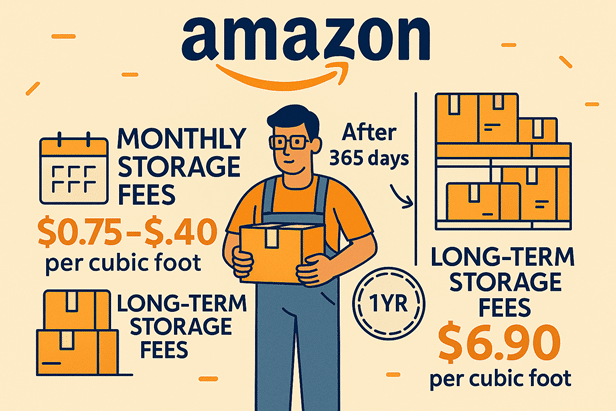
As of September 2025, Amazon charges a standard long-term storage fee of $6.90 per cubic foot per month for inventory stored longer than 365 days.
For products that remain in storage for over 730 days, the fee increases significantly to $15.00 per cubic foot per month.
It’s important to remember that these fees are separate from other Amazon charges, such as monthly inventory storage fees and standard fulfillment fees.
What Is the Minimum Long-Term Storage Fee?
Amazon also applies a minimum Long-Term Storage Fee of $0.15 per unit per month for items stored longer than 365 days but up to 730 days.
Unlike the standard fee, which is based on cubic footage, the minimum LTSF is calculated per unit. This means that even if your inventory takes up very little space, the minimum charge will still apply.
Sellers should note that this minimum fee is charged on top of regular FBA storage and fulfillment costs. To avoid these fees, inventory must either be removed before reaching the 365-day threshold or qualify for any available fee exemptions.
How to Calculate Amazon Long-Term Storage Fees
Amazon applies long-term storage fees to inventory stored for more than 365 days, calculated monthly based on product volume.
Here’s how the calculation works:
Step 1: Determine inventory volume
Measure each unit’s length, width, and height to calculate cubic feet, then multiply by the total number of units stored.
Step 2: Identify inventory age
Check the date Amazon received your inventory. This information is available in your Seller Central Inventory Dashboard.
Step 3: Review the fee rate
Refer to Amazon’s long-term storage fee schedule to confirm the applicable rate based on storage duration.
Step 4: Calculate the total fee
Multiply your total inventory volume by the applicable per-cubic-foot rate.
For example, 1,000 cubic feet stored at $6.90 per cubic foot would result in a monthly charge of $6,900.
These charges apply in addition to standard monthly storage fees, so ongoing inventory management is essential.
When Are Long-Term Storage Fees Charged?
Amazon evaluates long-term storage fees twice annually, on February 15 and August 15.
Inventory that has reached or exceeded 365 days in storage on either of these dates becomes eligible for LTSF.
For instance, if a product reaches 366 days in storage by February 15, the fee will be charged immediately.
These fees continue on a monthly basis until the item is sold, removed, or disposed of, making regular inventory reviews critical.
How to Check Inventory at Risk of Long-Term Storage Fees
To identify products approaching long-term storage thresholds, follow these steps:
- Log in to your Amazon Seller Central account
- Open the Inventory tab
- Navigate to Inventory Planning
- Review the Inventory Age column
Here, you’ll see how many units are nearing or exceeding the long-term storage limit.
You can also download a detailed report showing ASINs, quantities, and storage dates for at-risk inventory. Reviewing this data allows you to make timely decisions, such as discounting products or scheduling removals.
Regular monitoring helps prevent unexpected fees and supports better profitability.
How to Find Long-Term Storage Fees for Your Inventory
To view long-term storage fee charges for your products:
- Log in to Seller Central
- Click on Reports
- Select Fulfillment
- Choose Long-Term Storage Fee Charges
This report displays all products that have exceeded 365 days in storage along with the applicable fees.
How to Avoid Amazon Long-Term Storage Fees
Below are proven strategies to help you avoid unnecessary LTSF charges:
Manage Inventory Levels from the Start
Effective inventory control begins early. Overstocking often leads to aged inventory and higher storage fees.
Use tools like your Inventory Performance Index (IPI) and Inventory Age reports to track product movement and avoid ordering more stock than you can sell within a year.
Keeping inventory lean reduces storage risks and improves cash flow.
Use the Recommended Removal Report
Amazon provides a Recommended Removal Report highlighting products that should be removed to prevent long-term storage fees.
This report considers sales velocity, excess inventory, and performance data to identify problem SKUs.
To access it:
- Go to Reports in Seller Central
- Select Fulfillment → Inventory
- Open the Recommended Removals report
Removing or liquidating flagged products early can significantly reduce storage costs.
Analyze Slow-Moving Products
If products aren’t selling, understanding why is essential.
Key factors to evaluate include pricing, customer reviews, listing quality, seasonal demand, and competition. Optimizing listings, adjusting prices, or improving product positioning can help increase sales velocity and prevent inventory aging.
Lower Prices Strategically
Reducing prices can quickly move stagnant inventory and minimize long-term storage exposure.
Consider running limited-time promotions, discounts, or price adjustments based on competitor pricing and demand trends.
Amazon’s automated pricing and excess inventory tools can assist in optimizing prices while maintaining competitiveness.
Final Thoughts
Amazon long-term storage fees can be a hidden drain on profits if left unmanaged. By staying proactive—monitoring inventory age, removing slow-moving stock, and optimizing pricing—you can prevent unnecessary charges.
With smart planning and consistent oversight, you’ll stay in control of your inventory, protect your margins, and keep your Amazon business on a healthy growth path.