
If you shop online regularly, you’ve likely noticed those short, structured bullet points on Amazon product pages. As a seller, these aren’t just decorative elements — they’re powerful conversion tools. In a marketplace filled with countless options, optimized bullet points help your listing stand out and improve its visibility in search results.
For Amazon sellers, bullet points act as a strategic marketing asset. They provide a clear, scannable snapshot of what makes your product different. Think of them as mini sales pitches positioned directly where customers are making buying decisions.
These bullet points carry serious weight. They emphasize your product’s most valuable features and help shoppers quickly understand why your product is worth purchasing. Well-written and properly optimized bullets can significantly boost conversions by turning page visits into actual sales.
If you’re unsure how to upgrade your product listing using amazon bullet points or why they are so crucial, this guide will walk you through everything you need to know.
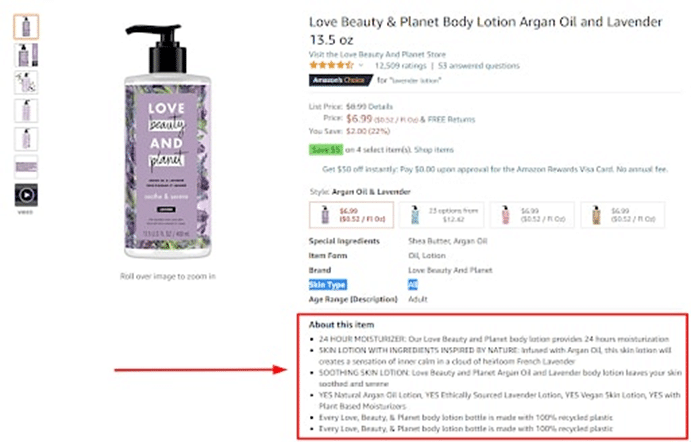
What Are Amazon Bullet Points?
Amazon bullet points are concise summaries of a product’s core features, displayed in an easy-to-read format. As the name suggests, the information is organized in bullet form to make it simple for shoppers to scan quickly. These bullets highlight specifications, dimensions, materials, colors, and other important product details buyers care about.
This section often answers common customer questions and helps them move closer to a purchase decision. On desktop, bullet points usually appear under the product title beside the image. On mobile devices, shoppers can find them by scrolling down to the “About this item” section.
Because shoppers often browse through dozens of listings in seconds, it’s essential to capture their attention quickly. Well-crafted bullet points help keep buyers engaged and encourage them to stay on your product page longer.
How to Add Bullet Points to an Amazon Listing
Adding bullet points is straightforward, whether you’re creating a new listing or editing an existing one.
To add bullet points:
- Log in to Amazon Seller Central.
- Locate your product listing and click “Edit.”
- Navigate to the “Description” tab.
- Find the “Key Product Features” field.
- Enter your bullet points in this section and save changes.
While the process is simple, what you write in those bullets matters far more than the steps themselves.
Why Bullet Points Matter: Key Benefits
Many sellers underestimate the power of bullet points, but they play a vital role in driving conversions. They allow you to clearly communicate your product’s unique selling propositions (USPs) and show customers why your product is the right solution for their needs.
Buyers typically check reviews and bullet points before making a purchase. Since most decisions are made within seconds, shoppers rely on bullets to quickly evaluate a product. If your bullet points are compelling and keyword-optimized, they can capture attention instantly.
Bullet points also support search visibility. Keywords used in this section are indexed along with your title and product description. Including relevant keywords naturally improves your chances of ranking higher in Amazon search results, which increases overall exposure.
Amazon Bullet Point Guidelines You Must Follow
Amazon has specific guidelines for bullet point formatting and content. Failing to follow these may result in your listing being suppressed or flagged.
Here are the core rules:
- Each bullet should begin with a capital letter.
- Sellers can use up to 5 bullet points, while vendors may use up to 10.
- Bullet points should highlight your product’s five most important features.
- Maintain consistency in length — avoid very short or overly long bullets.
- Do not include pricing, discounts, promotions, or sales language.
- Focus on factual information rather than exaggerated marketing claims.
- Avoid using HTML or special coding symbols.
Sticking to these guidelines ensures compliance and maintains a professional appearance.
Amazon Bullet Point Character Limits in 2026
Character limits vary depending on whether you are a seller or vendor and the category you’re listing in.
Generally:
- Sellers can use up to 500 characters per bullet point.
- Vendors are limited to approximately 250–255 characters per bullet.
Even though vendors may have more bullet point slots, they must use their shorter character allowance efficiently. Regardless of the limit, clarity and impact should always take priority over filling space.
Best Practices for Writing Amazon Bullet Points
Writing high-converting bullet points takes more than listing features. Your bullets should persuade, inform, and guide customers toward a buying decision.
Here are best practices to follow:
Focus on Benefits First
While product specifications are important, customers care most about how the product benefits them. Highlight outcomes and solutions rather than just listing technical features.
Conduct Proper Keyword Research
Use relevant, high-traffic keywords naturally within your bullet points. Research what buyers are actively searching for and incorporate those phrases strategically.
Avoid Keyword Stuffing
Repeating keywords excessively can harm readability and make your listing look unprofessional. Prioritize clarity and flow over forced optimization.
Stay Honest and Accurate
Avoid exaggerated claims like “best in the market.” Unrealistic promises can lead to disappointed customers and negative reviews.
Keep It Concise
Although you’re given a character limit, that doesn’t mean you should use all of it. Long bullet points may require shoppers to click “More,” and many won’t bother. Aim for concise yet informative messaging.
Use Simple Language
Write as if you’re explaining the product to someone unfamiliar with technical jargon. Clear communication improves comprehension and increases trust.
Address Customer Pain Points
Analyze customer reviews and competitor listings to understand common concerns. Use bullet points to directly answer those concerns and eliminate hesitation.
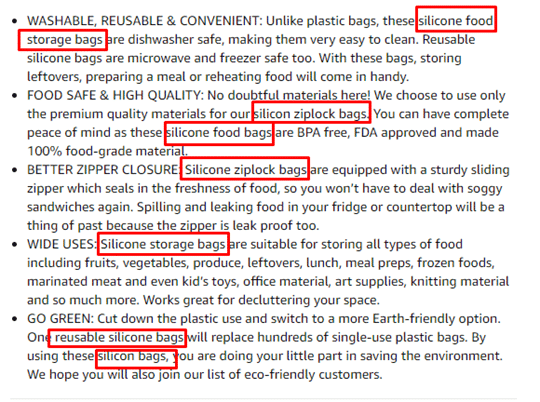
What Do High-Converting Bullet Points Look Like?
Strong bullet points read like clear value propositions. They explain why the product is useful and how it solves a specific problem.
They also incorporate the right keywords — not just random terms, but search phrases customers actually use. Aligning your bullet points with real buyer intent ensures relevance and stronger visibility.
Professional bullet formatting usually includes:
- Capitalized opening words
- Concise but complete sentences
- The most important benefit mentioned first
- Easy-to-scan structure
When shoppers can quickly understand what makes your product valuable, they’re far more likely to proceed to checkout.
Final Thoughts
Bullet points are one of the most powerful elements of your Amazon product listing. Because of their prominent placement, they strongly influence buying decisions and conversion rates.
To create magnetic bullet points in 2026, focus on clarity, strategic keyword placement, compliance with Amazon guidelines, and customer-centered messaging. The right balance between information and persuasion can significantly increase your sales performance.
When written thoughtfully, your bullet points don’t just describe your product — they sell it.