
In a highly competitive e-commerce environment where thousands of similar products are fighting for buyer attention, Amazon catalog management plays a critical role in standing out and driving customer engagement.
Simply uploading products to Amazon is not enough to generate consistent sales. Successful sellers focus on making their listings easy to discover, visually attractive, and informative.
This is where Amazon catalog management becomes essential.
Catalog management refers to organizing and presenting your products in a structured way so customers can quickly locate what they need. This includes selecting the correct category, writing optimized titles, uploading high-quality images, and adding accurate product details.
When your listings are organized properly and presented attractively, they naturally gain more attention, which can result in higher conversions and increased sales. In this guide, we’ll explore how to create and manage an Amazon catalog, discuss common challenges sellers face, and explain practical solutions to maintain a healthy catalog.
Understanding Catalog Management in E-Commerce
Catalog management is a fundamental aspect of e-commerce that focuses on organizing your complete product data in a way that is easy to navigate and visually appealing across different marketplaces. A well-structured catalog builds customer confidence and encourages purchasing decisions.
While the core concept of catalog management remains similar across platforms such as Amazon, Etsy, and eBay, each marketplace has its own functional requirements. Understanding these platform-specific guidelines helps you establish a stronger digital brand presence.
A product catalog typically includes essential information tied to your SKU or ASIN, such as product variations, size options, color choices, pricing, materials, origin, and other specifications. Each category demands unique attributes to give shoppers a complete and accurate understanding of the product.
Why Amazon Catalog Management Matters
An optimized catalog benefits both sellers and buyers. On one hand, it boosts visibility and sales; on the other, it enhances the overall shopping experience. Proper catalog management allows you to monitor product listings, prevent duplicates, reduce counterfeit risks, maintain accurate pricing, and streamline order fulfillment.
Here’s why catalog optimization is so important:
Improved Visibility Drives More Sales
Search engine optimization is a core element of catalog management. Optimized titles, bullet points, and product descriptions help listings rank higher in Amazon’s search results.
When your metadata is structured correctly and includes relevant keywords, your products are more likely to appear in front of the right audience. Increased visibility leads to higher traffic, which directly impacts sales performance.
Consistency Across Platforms and Variations
Effective catalog management ensures that product details remain accurate and consistent across all sales channels. This eliminates confusion among shoppers and helps maintain brand credibility.
Consistent data also supports better inventory planning by reducing the risks of overstocking or running out of products. As a result, sellers save time while maintaining operational efficiency.
Enhanced Customer Experience
A well-maintained catalog presents accurate and updated information, lowering the chances of misleading customers. When products are correctly indexed and optimized with relevant keywords, shoppers can easily find exactly what they are searching for.
This convenience creates a smooth browsing experience, encouraging customers to trust your brand and return for future purchases.
How to Manage Your Amazon Product Catalog
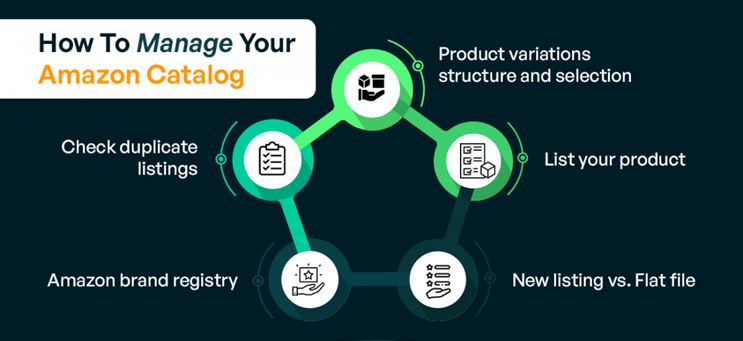
Managing your catalog on Amazon requires careful planning and execution. Below are the key steps sellers should follow:
Structuring Product Variations Correctly
Amazon allows sellers to group related products under a single listing. The main product is referred to as the “Parent,” while variations such as size or color are called “Children.”
Organizing variations correctly improves customer navigation and can positively impact your search performance. Grouping similar products under one parent listing often strengthens ranking potential.
Additionally, selecting the most suitable category for your product is critical. If unsure, choose a category that balances relevance and competition. The right category can increase your chances of earning badges like “Amazon’s Choice.”
Creating a High-Converting Product Listing
A product listing serves as your digital storefront. It includes product images, videos, descriptions, bullet points, pricing information, and customer reviews.
To build an effective listing:
- Fill in all required fields such as title, features, and product description using clear, customer-focused language.
- Use bullet points to highlight key benefits and specifications.
- Upload high-quality images on a white background, showcasing the product from multiple angles.
- Add videos and A+ content to enhance visual appeal and deliver additional product insights.
- Set competitive pricing and select fulfillment options such as FBA or FBM.
Strong visuals, detailed content, and accurate data significantly influence purchasing decisions.
Adding Products: Single Upload vs Flat File
When introducing a new product to Amazon, sellers can either upload listings individually or use the Flat File method for bulk uploads.
For single listings, the process includes navigating to Catalog in Seller Central, selecting “Add a Product,” choosing the appropriate category, and entering product details such as title, images, pricing, and fulfillment preferences.
Using Amazon Flat Files for Bulk Uploads
Amazon Flat Files function like Excel spreadsheets and allow sellers to upload or edit multiple listings simultaneously. This method is ideal for managing large catalogs efficiently.
Flat Files are especially useful when adding or updating dozens or hundreds of products, saving significant time and effort. Additionally, Amazon provides detailed error reports if any data issues occur during uploads, making troubleshooting easier.
To use a Flat File:
- Access Seller Central and navigate to Add Products via Upload.
- Download the appropriate product template for your category and marketplace.
- Enter product details under the correct columns.
- Save the file in tab-delimited text format.
- Upload the completed file and monitor its status.
This process simplifies large-scale catalog management and ensures accuracy across listings.
Leveraging Amazon Brand Registry
Amazon Brand Registry gives registered brand owners greater control and protection over their listings. Once enrolled, brands gain access to tools that help prevent unauthorized changes, report intellectual property violations, and block counterfeit sellers.
Registered brands can manage their titles, images, and descriptions while maintaining a consistent brand identity. Brand Registry also allows direct communication with Amazon support, offering faster issue resolution and long-term listing security.
Identifying and Merging Duplicate Listings
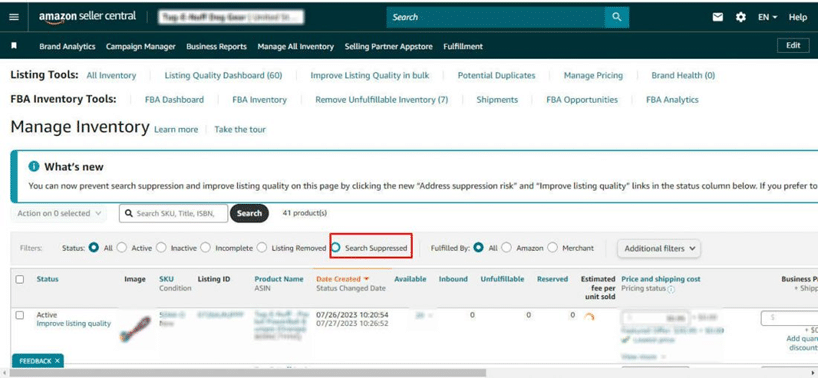
Duplicate listings can harm your catalog performance and confuse customers. Sellers should regularly search Amazon using brand names, product titles, and common keywords to identify duplicates. If similar listings already exist, avoid creating new ones. Instead, request a merge through Seller Support, prioritizing the ASIN with the strongest review history. This approach consolidates traffic, improves ranking, and maintains listing integrity.
Common Amazon Catalog Management Challenges
As your business grows, managing a large product catalog becomes increasingly complex. Some common challenges include:
Managing Marketplace-Specific Requirements
Different platforms display product information differently and require unique attributes. Sellers must adapt listings to meet each marketplace’s standards while maintaining consistency across channels.
Ensuring uniform product data across your website, Amazon, and social platforms builds credibility and prevents customer confusion.
Building Customer Trust
An organized catalog makes it easier for shoppers to find exactly what they want. Incorrect or poorly structured listings can lead to missed sales opportunities.
For example, if a customer searches for red socks but is shown unrelated results, trust and interest are lost. A clear, structured catalog allows shoppers to browse confidently using filters like price, size, or category.
Reducing Product Return Rates
Unclear descriptions or misleading images often result in higher return rates. While returns are part of e-commerce, consistently high returns indicate issues within your listings.
Improving product titles, images, and descriptions helps set accurate expectations, reducing dissatisfaction. A transparent catalog leads to fewer returns, stronger customer loyalty, and higher overall satisfaction.
Final Thoughts
Amazon catalog management is more than just product organization—it is a strategic process that shapes how customers interact with your brand. By combining accurate information, optimized content, engaging visuals, and consistency, sellers can significantly enhance visibility and buyer trust.
A well-maintained catalog not only drives sales but also creates a seamless shopping experience that keeps customers coming back in today’s competitive Amazon marketplace.