
Amazon offers sellers access to a vast product catalog, making it an important platform for businesses looking to expand their e-commerce operations. However, managing product information across multiple marketplaces can become challenging when you need to identify products, organize inventory, or match listings accurately. That can be made easier by tracing out Amazon ASIN.
Product identifiers play an important role in keeping this information organized. Understanding the difference between an Amazon Standard Identification Number (ASIN) and a Universal Product Code (UPC) can help you manage your catalog more effectively.
In this guide, we’ll explore what ASINs and UPCs are, why they matter, where to find product identifiers, and how to use available tools to look up a UPC from an Amazon ASIN.
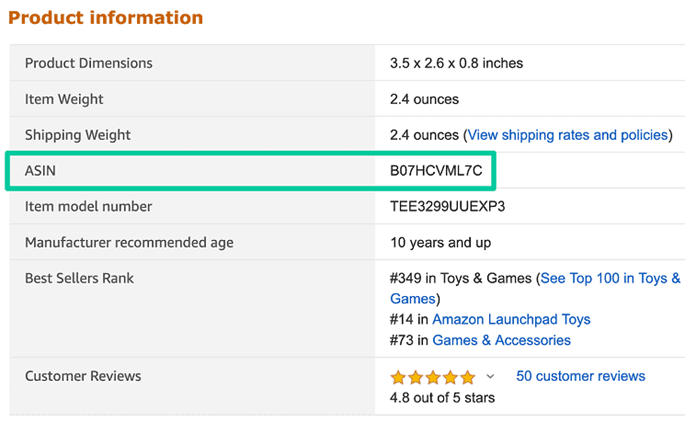
What Is an ASIN?
ASIN stands for Amazon Standard Identification Number. It is a unique, 10-character alphanumeric identifier that Amazon uses to organize and identify products within its catalog.
Every product detail page on Amazon has an associated ASIN. Sellers use these identifiers to locate existing product pages, manage their offers, and organize catalog information. Using accurate product information is essential because incorrect identifiers can cause listing errors and may violate Amazon’s product identification policies.
Books have product identifiers such as International Standard Book Numbers (ISBNs). Amazon also assigns ASINs to catalog entries for books, helping organize them within its marketplace.
What Is a UPC?
UPC stands for Universal Product Code. It is a standardized product identifier commonly used in North America to identify retail products. A UPC is typically represented by a barcode and a 12-digit number that can be scanned to retrieve product information.
Unlike an ASIN, which is specific to Amazon’s catalog, a UPC is an industry-standard identifier that can be used across different retail systems and marketplaces. UPCs are part of the broader Global Trade Item Number (GTIN) system. Other common product identifiers include EANs, which are widely used internationally.
Manufacturers and brand owners generally obtain legitimate product identifiers through the appropriate standards organizations. Sellers should use the correct identifier associated with their specific product instead of assigning a random code.
Why Do You Need a UPC?
Product identifiers help sellers and retailers distinguish one item from another. For Amazon sellers, UPCs can support accurate catalog creation, product matching, and inventory management.
Here are some important benefits of using the correct UPC:
- Product identification: Helps identify a specific retail product and distinguish it from similar items.
- Inventory management: Supports more accurate stock tracking and recordkeeping.
- Shipping and fulfillment: Helps businesses identify products as they move through warehouses and distribution networks.
- Marketplace compatibility: Makes it easier to match product information across compatible retail platforms.
- Listing accuracy: Helps marketplaces verify product details and connect listings with existing catalog records.
Using the right product identifier can reduce errors and make it easier to maintain consistent product information across your sales channels.
Where Can You Find a UPC on Amazon?
If you need a UPC for an item listed on Amazon, there are several places to check. The best approach depends on whether you already have the physical product or only know its Amazon listing.
1. Check the product packaging
The UPC is commonly printed beneath the barcode on a product’s packaging. If you have the item in your inventory, examining the packaging is a practical starting point.
2. Review the manufacturer’s product information
The manufacturer or brand owner may provide the product’s UPC, EAN, or another GTIN through its official website, product catalog, or support team.
3. Search Amazon Seller Central
Amazon Seller Central allows sellers to search for products using supported identifiers, including UPCs and EANs. When a matching catalog entry exists, Amazon can display the corresponding product so you can create an offer against the correct listing.
4. Use a product identification lookup tool
If you only have an ASIN, a third-party lookup tool may help retrieve the associated UPC or other product information. However, results can vary because not every database contains complete or verified identifiers.
Keep in mind that most Amazon categories require a valid product identifier when creating new listings, but exemptions may be available for eligible products. A UPC is not universally required for every listing.
Understanding the Role of Product Identifiers
Product identifiers help businesses distinguish individual products and maintain accurate catalog records. Although ASINs, UPCs, EANs, and ISBNs serve related purposes, they are not interchangeable.
Here is how the main identifiers differ:
- ASIN: An Amazon-specific identifier used to organize products within Amazon’s catalog.
- UPC: A standardized product identifier commonly used in North America.
- EAN: A product identifier commonly used in international retail markets.
- ISBN: A standardized identifier used for books and other qualifying publications.
These identifiers help retailers match products across systems, maintain inventory records, and reduce confusion between similar items.
For Amazon sellers, it is particularly important to distinguish between a product identifier and an ASIN. A valid UPC or EAN may help Amazon match a product to an existing catalog entry or create a new listing where appropriate. Amazon assigns the ASIN to the corresponding catalog entry.
How to Convert an Amazon ASIN to a UPC
Converting an ASIN to a UPC generally involves using a product lookup tool to find the external identifier associated with an existing Amazon product. The result depends on whether reliable UPC information is available for that particular ASIN.
Follow these steps to perform a lookup.
Step 1: Find the Amazon ASIN
Open the Amazon product page you want to research. You can usually locate the ASIN in the product details section or within the product URL.
Copy the complete 10-character identifier and check that it belongs to the exact product you want to identify.
Step 2: Choose an ASIN-to-UPC Lookup Tool
Select a product identification tool that supports ASIN searches. Some tools provide basic lookups, while others offer additional product data or bulk processing features.
Before using a tool, review its data sources, limitations, and pricing. Not every service provides the same level of coverage or verification.
Step 3: Enter the ASIN
Paste the ASIN into the tool’s search field. Depending on the service, you may also need to select the relevant Amazon marketplace or provide additional product information.
Submit the search to retrieve any available product identifiers.
Step 4: Review the Results
If the database contains a match, it may return a UPC, EAN, product title, brand, or other associated information.
Compare these details with the Amazon listing and manufacturer information. Make sure the results correspond to the correct variation, size, color, or packaging configuration.
Step 5: Verify the UPC Before Using It
Do not rely on an unverified lookup result when creating a product listing or placing an order with a supplier. Confirm the identifier against the product packaging, manufacturer records, or a trusted product identification source.
If the lookup does not return a UPC, contact the manufacturer or check the existing product documentation. Avoid using an unrelated UPC as a substitute.
Using UPC-to-ASIN and ASIN-to-UPC Conversion Tools
Product lookup tools can work in both directions, depending on their available databases and supported features.
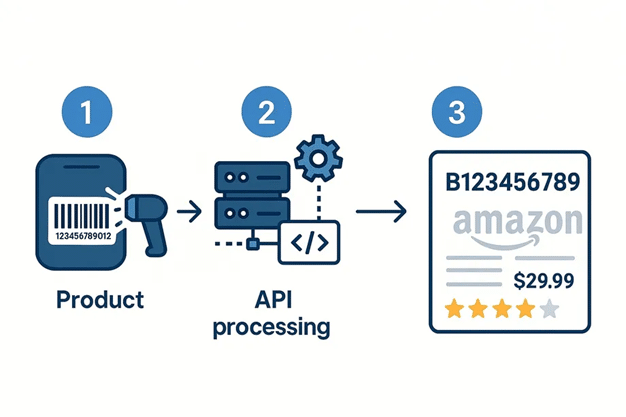
A UPC-to-ASIN lookup helps you identify an Amazon catalog entry associated with a UPC. This can be useful when you have a product barcode and want to locate an existing listing.
An ASIN-to-UPC lookup starts with an Amazon identifier and attempts to retrieve the associated UPC. Sellers may use this approach when researching products, comparing catalog information, or checking supplier records.
Some tools provide bulk lookup options, allowing users to submit multiple identifiers through spreadsheets or CSV files. Other services may offer APIs for integrating product data into inventory management, research, or reporting systems.
A Professional Seller Central account is not necessarily required for every third-party lookup tool. Access requirements depend on the service being used. Similarly, free access and bulk processing features vary by provider.
Most importantly, a conversion tool cannot guarantee a UPC for every ASIN. Some catalog entries may have incomplete data, multiple identifiers, or no publicly available UPC information.
Other Useful APIs and Tools for Your Amazon Business
Beyond product identifier lookup, Amazon sellers can use research tools and APIs to analyze product performance, improve listings, and estimate profitability. The available capabilities vary by provider, so choose solutions that fit your business requirements.
Product Trends and Research Tools
Product research tools help sellers understand demand, compare competing products, and identify changes in marketplace activity. Depending on the data available, these tools may provide information such as estimated sales, prices, ratings, reviews, and sales-rank history.
You can use this information to:
- Research potential product opportunities.
- Monitor competitors and category trends.
- Evaluate changes in product demand.
- Compare products before investing in inventory.
Historical data and estimates should be treated as research indicators rather than guarantees of future sales.
Listing Quality and Optimization Tools
Listing analysis tools help sellers review product pages and identify opportunities to improve their content. They may evaluate titles, bullet points, descriptions, images, keywords, and other listing attributes.
These tools can be useful when reviewing competitor listings or checking whether your product pages communicate important information clearly. However, recommendations should be assessed against Amazon’s current listing requirements and the actual needs of your customers.
Amazon Profit Calculators
Profit calculators help sellers estimate how much they may earn after accounting for relevant expenses. Depending on the calculator, these costs may include Amazon selling fees, fulfillment charges, shipping, storage, product costs, and other operating expenses.
By entering realistic cost and pricing figures, you can estimate your net profit and profit margin before committing to a product or changing its price.
Profit calculations are particularly useful for comparing sourcing options, setting prices, and evaluating whether a product remains viable as costs change.
Final Thoughts
Understanding the relationship between ASINs and UPCs can make product research and catalog management easier for Amazon sellers. While an ASIN identifies a product within Amazon’s catalog, a UPC is a standardized product identifier that can be used across retail systems.
When you need to convert an Amazon ASIN to a UPC, start with a reliable lookup tool and verify the result against manufacturer or product documentation. If no UPC is available, investigate the product’s original records rather than using an unrelated identifier.
Combining accurate product identification with effective listing optimization, inventory management, and profitability analysis can help you maintain better catalog data and make more informed decisions for your Amazon business.