
Online shoppers are always looking for better value. Whether it’s saving money, reducing shopping time, or purchasing complementary products together, customers appreciate offers that make buying easier. For Amazon sellers, one of the most effective ways to meet these expectations is through virtual bundles.
The Amazon Virtual Product Bundles program allows eligible brand owners to combine related products into a single listing without physically packaging them together. This simple yet powerful feature helps increase average order value, encourages customers to purchase more items, and creates a better shopping experience. When used strategically, virtual bundles can become an excellent tool for boosting conversions and maximizing revenue.
In this guide, you’ll learn how Amazon Virtual Product Bundles work, why they matter, their eligibility requirements, and the best strategies to use them successfully in your Amazon business.

How Does Product Bundling Work?
Product bundling has long been one of the most successful sales strategies in retail. Instead of asking customers to search for multiple products individually, sellers combine complementary items into one convenient offer. This not only saves shoppers time but also encourages them to purchase additional products they may already need.
Customers often prefer buying complete solutions rather than individual products. For example, someone purchasing a kitchen blender may also need measuring cups or reusable smoothie bottles. By presenting these items together, sellers simplify the buying process while increasing the total value of each order.
One of the biggest advantages of product bundling is that it aligns with how Amazon recommends products. Amazon’s recommendation engine analyzes customer behavior, including previous purchases, browsing history, shopping cart activity, and products frequently purchased together. These recommendations influence a significant percentage of customer purchases, making them a valuable resource when deciding which products to bundle.
Instead of guessing which products work well together, sellers can study the “Frequently Bought Together” and “Customers Also Bought” sections on their listings. These insights reveal natural buying patterns and help identify combinations that customers already find useful.
For instance, if you sell child safety drawer locks, you’ll likely notice customers also purchase corner protectors, cabinet latches, or door stoppers. Creating a bundle that includes these complementary products gives shoppers everything they need for childproofing their home in one purchase while increasing your average order value.
The key to successful product bundling is relevance. Every item included in the bundle should add genuine value and solve a common customer need. Bundles that feel logical and convenient tend to generate higher conversions than those created simply to increase sales. Rather than overwhelming buyers with unrelated products, focus on creating packages that save them time, simplify their shopping experience, and provide better overall value.
When customers immediately recognize the convenience of purchasing everything they need in a single listing, they are far more likely to complete their purchase. That’s exactly why product bundling continues to be one of the most effective strategies for increasing both sales volume and customer satisfaction on Amazon.
What Is Amazon Virtual Product Bundles Program?
Amazon’s Virtual Product Bundles program is a feature designed specifically for eligible brand owners who want to sell multiple complementary products as a single offer without physically packaging them together. Unlike traditional product bundles that require sellers to assemble and ship products as one package, virtual bundles allow Amazon to combine existing FBA inventory into one listing while keeping each product stored separately.
With this program, sellers can bundle anywhere between two and five related ASINs under a single product detail page. Customers see the bundle as one complete offer, but when an order is placed, Amazon simply picks each individual product from its fulfillment centers and ships them together. This eliminates the need for sellers to create new packaged inventory or send specially assembled bundle products to Amazon warehouses.
For example, suppose you sell an electric guitar and also offer a compatible tuner under separate listings. Using the Virtual Product Bundles tool, you can create a new bundle listing that includes both products. Customers looking for a beginner guitar package can purchase everything they need in one click, while Amazon fulfills the order using the existing inventory of both ASINs.
This approach gives sellers greater flexibility to introduce attractive product combinations without increasing storage complexity or operational costs. It also enables brands to showcase complementary items together, making it easier for shoppers to discover products they might have otherwise overlooked.
Why Did Amazon Introduce the Virtual Product Bundle Tool?
Amazon has continuously invested in improving the customer shopping experience while helping sellers increase their sales. The Virtual Product Bundles program is another example of that strategy. By allowing sellers to combine complementary products without creating new inventory, Amazon simplifies inventory management while encouraging larger purchases.
For sellers using Fulfillment by Amazon (FBA), managing bundled inventory traditionally required creating a separate SKU, assembling products before shipment, and maintaining additional stock levels. Virtual Bundles remove these operational challenges by using inventory that already exists in Amazon’s fulfillment network.
The system automatically tracks the availability of every product included in the bundle. If one item begins running low, Amazon adjusts the bundle’s availability based on the component with the lowest inventory. This helps prevent overselling while keeping inventory synchronized across all listings.
Every virtual bundle receives its own unique SKU and product detail page, allowing sellers to customize the title, images, bullet points, product description, and pricing. This provides greater marketing flexibility while maintaining independent inventory for each product.
Although the Virtual Product Bundles program was initially introduced as a beta feature, Amazon has continued expanding and improving it over time. More eligible Brand Registered sellers now have access to the tool, making it an increasingly valuable option for businesses looking to grow their catalog without creating additional fulfillment complexity.
For brands focused on increasing average order value and improving cross-selling opportunities, Virtual Product Bundles provide a practical solution that benefits both sellers and customers. Instead of requiring shoppers to purchase several products individually, brands can present a complete solution through a single listing, making the buying process faster, easier, and more appealing.
Benefits of Using Amazon Virtual Product Bundles
Amazon Virtual Product Bundles offer more than just an opportunity to group products together. When used effectively, they can improve the shopping experience, increase revenue, and simplify inventory management without adding extra operational work. Here are some of the biggest advantages of using this feature.
No Need for Pre-Packaged Inventory
One of the most significant benefits of Virtual Product Bundles is that sellers don’t have to physically package products together before sending them to Amazon’s fulfillment centers. Each item remains in its existing FBA inventory, and Amazon automatically picks the required products when a customer places an order.
This approach eliminates the need to create separate packaged inventory, reduces storage complexity, and saves valuable preparation time. Sellers can also launch multiple bundle combinations without making changes to their existing inventory.
Increase Cross-Selling Opportunities
Virtual bundles make it easy to introduce customers to other products within your brand’s catalog. Instead of relying solely on individual product sales, sellers can showcase complementary items that naturally work together.
For example, a customer purchasing a coffee machine may also need coffee pods, cleaning tablets, or reusable filters. Presenting these products as a bundle helps customers discover additional items while increasing the total value of each purchase.
Improve Average Order Value
One of the primary goals of product bundling is to encourage customers to purchase more than one item during a single transaction. Since buyers receive a complete solution instead of shopping for products separately, they are often willing to spend more.
Higher average order values can significantly improve overall revenue without requiring additional customer acquisition costs.
Offer Better Value to Customers
Customers appreciate convenience and savings. A thoughtfully created bundle can provide both by combining products they already intend to purchase into one easy-to-buy package.
Even a modest discount compared to buying each product individually can make the bundle more attractive while improving conversion rates. Buyers enjoy the perception of receiving greater value, making them more likely to complete their purchase.
Expand Your Product Portfolio
Virtual bundles allow brands to create new product listings using their existing catalog. This increases product visibility without introducing new inventory or manufacturing additional products.
By offering different bundle combinations for various customer needs, sellers can target multiple buying scenarios while strengthening their overall product portfolio.
Eligibility and Requirements
Not every Amazon seller can create Virtual Product Bundles. Amazon has established specific eligibility requirements to ensure the feature is used by qualified brands that maintain consistent inventory and product quality.
To qualify for the Virtual Product Bundles program, sellers must meet the following conditions:
- You must be enrolled in Amazon Brand Registry.
- Every ASIN included in the bundle must belong to your registered brand.
- All products must have active Fulfillment by Amazon (FBA) inventory.
- The bundled products must be listed in New condition.
- Each bundle can contain two to five complementary ASINs.
- Certain product types, including digital products, gift cards, and used or renewed items, cannot be included in virtual bundles.
- Bundles should consist of products that naturally complement one another to provide genuine value to customers.
Amazon also recommends using supported desktop browsers, such as Chrome or Firefox, when creating bundles through Seller Central. While customers can purchase bundles across supported platforms, some bundle-related management features may work best on the desktop version of Seller Central.
Before creating a bundle, it’s also important to ensure that each product has sufficient inventory. Since the availability of the bundle depends on the stock level of every included ASIN, running out of just one product can make the entire bundle unavailable for purchase.
Meeting these eligibility requirements allows sellers to take full advantage of Amazon’s Virtual Product Bundles while providing customers with a seamless shopping experience. By selecting complementary products and maintaining healthy inventory levels, brands can maximize both visibility and sales through this powerful feature.
How to Set Up an Amazon Virtual Product Bundle
Creating an Amazon Virtual Product Bundle is a straightforward process, especially if you’re already using Fulfillment by Amazon (FBA) and are enrolled in Brand Registry. Once you have access to the feature in Seller Central, you can build bundle listings that showcase complementary products without changing your existing inventory.
Follow these steps to create your first virtual bundle.
Step 1: Access the Virtual Bundles Tool
Sign in to your Amazon Seller Central account and navigate to the Virtual Bundles section. From there, you can begin creating a new bundle using products from your brand’s catalog.
Amazon only displays ASINs that meet the eligibility requirements, making it easier to select products that qualify for bundling.
Step 2: Select Complementary Products
Choose between two and five ASINs that naturally work well together. The goal is to create a bundle that offers a complete solution instead of combining unrelated products.
For example:
- A yoga mat paired with resistance bands and a water bottle.
- A skincare cleanser bundled with a moisturizer and sunscreen.
- A gaming keyboard combined with a matching mouse and mouse pad.
Selecting products that customers frequently purchase together increases the chances of generating additional sales and improving customer satisfaction.
Step 3: Upload High-Quality Images
Amazon allows sellers to upload multiple images for their virtual bundle listing. While the individual product images can automatically populate the gallery, it’s highly recommended to create a custom main image that clearly displays every product included in the bundle.
A professional bundle image helps customers immediately understand what they’re purchasing and often improves click-through rates from search results.
Include additional lifestyle images that demonstrate how the products work together whenever possible. This gives shoppers a better understanding of the value offered by the bundle.
Step 4: Create an Optimized Listing
After selecting your products, complete the product listing by adding:
- A keyword-rich title
- Informative bullet points
- A compelling product description
- A unique SKU for internal inventory management
Your listing should clearly explain why the products are bundled together and how customers benefit from purchasing them as a package.
Rather than simply listing the included items, focus on solving a customer problem or highlighting the convenience of buying everything in one purchase.
Step 5: Set a Competitive Bundle Price
Pricing plays a major role in the success of a virtual bundle. Amazon generally expects bundle pricing to provide value compared to purchasing each item separately.
Offering a small discount often makes the bundle more attractive and encourages customers to choose it over buying products individually.
It’s also important to monitor the prices of the individual ASINs. If one product’s price changes significantly, you may need to adjust the bundle price to remain competitive and preserve Buy Box eligibility where applicable.
Step 6: Publish and Monitor the Bundle
Once all the listing details have been reviewed, publish the bundle. Your new bundle listing will become available for customers to purchase, while Amazon continues fulfilling orders using your existing FBA inventory.
Although certain listing details—such as the title, description, bullet points, images, and price—can be updated later, some elements cannot be changed after creation. For example, the products included in the bundle and the assigned SKU are generally fixed, so it’s important to verify your selections before publishing.
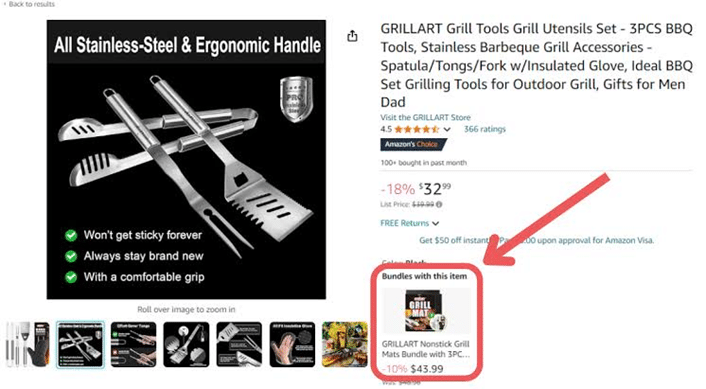
Optimize Your Bundle Listing for Better Visibility
Creating a virtual bundle is only the first step. To maximize its performance, your listing should also be optimized for Amazon search.
Start by researching keywords that accurately reflect how customers search for your bundled products. Include your primary keywords naturally within the title, bullet points, and product description without overstuffing them.
Beyond keywords, make sure your listing communicates the value of the bundle. Explain how the included products work together, what problems they solve, and why purchasing them together is a better option than buying them separately.
High-quality images, persuasive copy, competitive pricing, and positive customer reviews all contribute to better conversion rates. Regularly monitor your bundle’s performance and make improvements whenever necessary to keep it competitive within your category.
By combining strong optimization with carefully selected complementary products, you can create virtual bundles that attract more shoppers, increase conversions, and generate higher average order values.
How to Track the Performance of Your Virtual Product Bundles
Creating a virtual bundle is only the beginning. To determine whether your bundles are driving additional revenue, you’ll need to monitor their performance regularly and evaluate how customers respond to your offers.
Unlike standard product listings, virtual bundle sales may not always appear as separate listings within certain Seller Central reports. Since each order is fulfilled using the individual component ASINs, inventory is deducted from those products rather than from a separate physical bundle.
Amazon provides reporting tools and downloadable sales data that allow eligible sellers to review bundle performance over time. These reports typically include important metrics such as:
- Bundle ASIN
- Bundle title
- Units sold
- Total sales revenue
- Sales dates
Analyzing this data helps you understand which bundles are performing well and which combinations may require adjustments.
When reviewing your reports, pay attention to trends such as:
- Which bundles generate the highest sales volume.
- Seasonal changes in bundle demand.
- Products that are frequently purchased together.
- Inventory levels for each component ASIN.
- Profit margins after discounts and fulfillment costs.
Consistently monitoring these metrics allows you to optimize your pricing strategy, replace underperforming products, and create new bundle combinations based on customer buying behavior.
Best Practices for Successful Product Bundling
While virtual bundles can be highly effective, their success depends on how thoughtfully they are created. Simply grouping random products together is unlikely to produce strong results. Instead, focus on delivering real value to your customers.
Bundle Products That Naturally Complement Each Other
Choose products that solve a common problem or are typically used together. Customers are much more likely to purchase bundles that feel practical and convenient.
For example, a camping bundle containing a lantern, portable stove, and cookware makes far more sense than combining unrelated outdoor products.
Keep Individual Listings Available
One of the biggest advantages of Amazon Virtual Product Bundles is that customers can still purchase each item separately.
Offering both individual products and bundled options gives shoppers flexibility. Some customers only need one product, while others appreciate the convenience and savings of purchasing multiple items together.
Providing both options allows you to reach a broader audience without limiting buying choices.
Focus on Customer Value
A successful bundle should offer more than just multiple products in one package—it should provide a better overall shopping experience.
Customers should immediately understand why buying the bundle benefits them, whether through convenience, cost savings, or receiving a complete solution.
Review Performance Regularly
Customer preferences change over time. A bundle that performs well today may become less effective as trends evolve or new products enter the market.
Review your bundle performance regularly and don’t hesitate to update pricing strategies or introduce new product combinations based on customer demand.
Avoid Overcomplicating Bundles
Adding too many unrelated products can make bundles less appealing and confuse buyers.
Instead, keep your bundles focused on solving a specific customer need. Simpler, well-targeted bundles often achieve higher conversion rates than overly complex offers.
Product Bundling Is Powerful—But Strategy Matters
Product bundling is one of the most effective ways to increase average order value, but not every bundle guarantees success. The key lies in offering combinations that customers genuinely want to buy.
For example, imagine you’re selling a gaming console along with several popular games. Allowing customers to purchase the console individually while also offering a discounted bundle gives them greater flexibility. Buyers who already own certain games can purchase only what they need, while new customers may prefer the complete package.
This approach, often referred to as mixed bundling, generally performs better because it accommodates different purchasing preferences.
In contrast, limiting customers to purchasing only the bundled package—commonly known as pure bundling—may discourage some buyers. Customers who only need one item could postpone their purchase, wait for discounts, or choose a competitor offering individual products.
Providing multiple purchasing options helps reduce friction in the buying process and increases the likelihood of converting different types of shoppers.
Ultimately, the most successful bundles are those that balance convenience, value, and customer choice.
Conclusion
Amazon Virtual Product Bundles provide brand owners with a practical way to increase sales without creating additional inventory or changing existing fulfillment processes. By combining complementary products into a single listing, sellers can improve customer convenience, encourage larger purchases, and strengthen their overall product catalog.
Success with virtual bundles depends on careful product selection, competitive pricing, optimized listings, and ongoing performance analysis. Rather than creating bundles solely to increase order values, focus on solving customer problems and delivering genuine value.
As customer shopping habits continue to evolve, virtual product bundles remain an excellent opportunity for Amazon sellers to improve conversions, boost average order value, and build stronger relationships with their customers. With the right strategy, this feature can become an important part of a long-term Amazon growth plan.