
Inventory management plays a critical role in determining the success of any FBA seller. Poor inventory decisions can negatively impact your business, while effective strategies can significantly boost profitability. By managing inventory efficiently, sellers can lower storage expenses, reduce unnecessary costs, and improve overall margins.
To help sellers evaluate how well they manage their stock, Amazon introduced the Inventory Performance Index (IPI). This metric reflects how effectively you balance product demand with available inventory while maintaining optimal stock levels.
Before diving into the ideal IPI score for 2026 and its required thresholds, it’s important to first understand what the IPI score is, how it works, and the key factors that influence it.
What is the Inventory Performance Index?
The Inventory Performance Index (IPI) was launched in 2018 as a way to assess inventory health and regulate stock levels. Its primary goal is to help sellers identify inefficiencies in their inventory management and improve their overall performance.
According to Amazon, the IPI score evaluates both inventory health and profitability. It also considers how effectively sellers resolve listing issues, maintain stock availability for high-demand products, and remove inactive or unavailable listings.
Inventory health largely depends on maintaining the right balance. Too little inventory can result in stockouts and missed sales opportunities, while excess inventory increases storage costs and ties up capital.
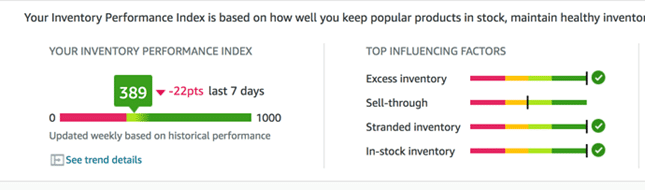
IPI scores range from 1 to 1000, with higher scores indicating better performance.
This system benefits both sellers and Amazon. Sellers experience fewer lost sales and reduced storage costs, while Amazon can optimize warehouse space by ensuring products move efficiently through its fulfillment network.
How to Check Your Amazon IPI Score
You can easily monitor your IPI score through the Inventory Dashboard in Seller Central, provided your account is active.
To access your score:
Log in to Seller Central, navigate to the Inventory tab, and select Inventory Planning. From there, open the Performance section to view your IPI score. You can also expand the Storage Monitor for additional details.
Amazon provides helpful tools within the dashboard to improve your score, including recommendations for reducing excess inventory, restocking popular products, and fixing stranded inventory issues.
Your IPI score is updated weekly—typically every Monday—based on your performance over the past three months.
How is Amazon’s IPI Calculated?
Amazon does not publicly disclose the exact formula used to calculate the IPI score. The company considers it proprietary, similar to the Buy Box algorithm.
However, Amazon has clarified that running out of stock does not directly reduce your IPI score. Instead, the focus is on maintaining efficient inventory levels and minimizing unproductive stock.
The most impactful ways to improve your IPI include reducing excess inventory and increasing your sell-through rate. Maintaining lean inventory while meeting customer demand is key to achieving a higher score and lowering storage fees.
Amazon IPI Score Threshold 2026
Amazon sets a minimum IPI threshold that sellers must maintain to avoid inventory restrictions. If your score falls below this limit, your account may face storage capacity limits and shipment restrictions.
Currently, the minimum threshold stands at 400, reduced from earlier benchmarks. Sellers who fall below this score may experience tighter limits on how much inventory they can send to fulfillment centers.
In recent updates, Amazon has also reduced inventory capacity allowances to approximately five months of forecasted sales and reintroduced ASIN-level restock limits. This means even if you have overall capacity available, individual products may still face restrictions.
These changes highlight Amazon’s focus on faster-moving, efficient inventory systems. Maintaining a score above 400 is essential for avoiding penalties and ensuring smoother operations.
Additionally, storage is no longer unlimited—even for high-performing sellers. Since 2023, Amazon has shifted to monthly capacity limits measured in cubic feet, based on performance metrics such as IPI and sales velocity.
Higher IPI scores generally result in greater storage capacity, but sellers must still manage inventory carefully to stay within limits.
Factors Affecting IPI Score
Although Amazon does not reveal the exact formula, it does highlight the primary factors influencing your IPI score. These include excess inventory, stranded inventory, sell-through rate, and in-stock rate.
Excess inventory measures the percentage of stock that exceeds demand. Stranded inventory refers to items that are not actively listed due to listing issues. The sell-through rate evaluates how quickly products are sold relative to available stock, while the in-stock rate reflects how consistently popular items remain available.
Together, these metrics provide a comprehensive view of your inventory efficiency and directly impact your IPI score.
Excess Inventory
Excess inventory is one of the most significant contributors to a low IPI score. Amazon prioritizes fast-moving products rather than acting as long-term storage for sellers.
Products are considered excess when inventory levels exceed roughly 90 days of expected demand. Holding too much stock increases storage costs and reduces efficiency.
A better strategy is to maintain around 30 to 60 days of inventory to avoid overstocking. Amazon’s dashboard provides clear recommendations, including the number of excess units and suggested actions to optimize inventory levels.
It also offers insights such as estimated long-term storage costs and the number of SKUs affected by excess stock.
FBA Sell-Through Rate
Sell-through rate is calculated based on the number of units sold and shipped over the past 90 days compared to the average inventory held during that time.
Amazon provides detailed analytics to help sellers identify low-performing products and improve sales velocity. By reviewing inventory age, sales data, and storage costs, sellers can take action to boost performance.
Improving sell-through helps reduce storage fees and enhances overall inventory efficiency.
Stranded Inventory
Stranded inventory occurs when products are stored in fulfillment centers but cannot be sold due to listing issues. This leads to unnecessary storage fees and missed sales opportunities.
Fortunately, this issue is relatively easy to fix. Amazon provides a dedicated section where sellers can identify stranded items, understand the cause, and relist them quickly.
Regularly monitoring and resolving stranded inventory ensures your products remain available for purchase.
In-Stock Inventory
Maintaining strong in-stock levels for high-demand products is another important factor. While it may not directly reduce your IPI score, it plays a key role in improving overall performance.
Amazon tracks how consistently your products remain in stock, especially those with high sales velocity. Keeping these items available reduces lost sales and supports better inventory management.
What Happens If Your IPI Score Drops?
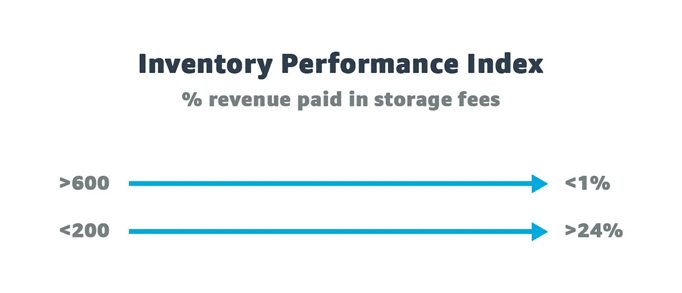
If your IPI score falls below the required threshold, Amazon may impose strict storage limits and restrict your ability to send additional inventory.
Sellers with scores under 400 may also face additional fees, including storage utilization surcharges for holding excessive inventory. Recent updates have made enforcement more immediate, rather than waiting for quarterly reviews.
Additionally, long-term storage fees now apply sooner, increasing the importance of maintaining efficient inventory levels.
These penalties can significantly impact profitability, making it essential to monitor your IPI score regularly.
How to Improve Your IPI Score
Improving your IPI score requires consistent effort and strategic inventory management.
Start by increasing your sell-through rate through better product listings, targeted advertising, and keyword optimization. Conducting thorough product research can also help you identify high-demand items.
Next, reduce excess inventory by removing slow-moving or unprofitable products. Amazon’s recommendations can guide you in making these decisions.
Avoid long-term storage fees by regularly reviewing inventory age and creating removal orders for outdated stock.
Finally, stay proactive with listing management by fixing errors, monitoring stranded inventory, and maintaining optimal stock levels—especially for top-performing products.
Conclusion
Efficient inventory management is essential for maximizing profits on Amazon. By maintaining the right balance between supply and demand, sellers can avoid unnecessary costs and improve operational efficiency.
For new sellers, it’s wise to start with smaller inventory quantities and gradually scale based on demand insights. Over time, experience and data will help you determine the ideal stock levels for each product.
By consistently monitoring your inventory performance and acting on Amazon’s recommendations, you can maintain a healthy IPI score and build a more profitable FBA business.