
Attention Amazon sellers! There’s a significant update you need to be aware of—Amazon has revised its customer communication rules, particularly the buyer-seller messaging policy.
Staying updated with these changes is essential to ensure your messaging practices remain compliant and effective.
In this guide, we’ll break down everything you need to know so you can confidently navigate the updated buyer-seller messaging guidelines. Let’s get started.
Amazon Customer Communication Updates – Key Dates
Amazon frequently updates its Terms of Service, and communication policies are no exception. A major update to the buyer-seller messaging policy was introduced on September 8, 2020.
The implementation of these changes began on November 3, 2020, giving sellers a limited window to adapt. These updates were introduced to address confusion among third-party sellers and app providers regarding buyer communication rules.
With this revision, Amazon clarified two important points:
- Sellers are allowed to request reviews from buyers
- Sellers can use approved third-party tools from the marketplace to request reviews
Types of Allowed Amazon Buyer-Seller Messages
Amazon categorizes buyer-seller communication into two main types: proactive permitted messages and necessary permitted messages.
All permitted messages must be sent within 30 days of the order date.
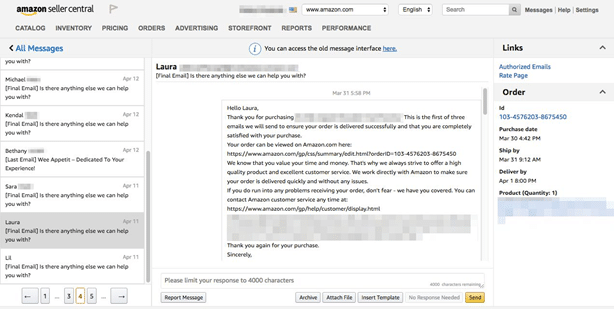
Necessary permitted messages include any communication required to complete an order or respond to a customer inquiry. These are only sent when a buyer initiates contact regarding their purchase.
Proactive permitted messages, on the other hand, are initiated by the seller without prior customer contact.
How to Send Proactive Messages
Sellers can send proactive messages through several approved methods:
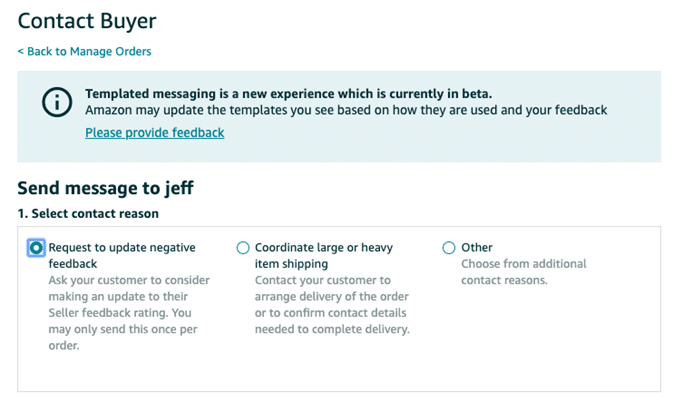
- Using templates in Seller Central by accessing the buyer’s name in the orders section
- Clicking the “Request a Review” button on the order details page
- Integrating with Amazon’s Seller API
- Using third-party tools available in the Amazon Marketplace
When You Can Use Proactive Messaging
Proactive messages can be sent within 30 days after order completion for purposes such as:
- Resolving fulfillment-related issues
- Sending invoices
- Confirming custom orders or designs
- Requesting necessary order details
- Communicating about returns
- Requesting product reviews or seller feedback
- Scheduling deliveries or services
These messages must always relate directly to the order. Additionally, sellers should use the buyer’s preferred language and include the correct order ID in every message.
Important Things to Remember
Requesting reviews is still allowed under Amazon’s updated policy. However, sellers must be cautious about how and when they ask for feedback.
To remain compliant, ensure that your messaging content follows Amazon’s rules and avoids any manipulative or misleading language.
What Is Not Allowed in Amazon Messaging
Amazon has clearly defined what types of messages are prohibited. These include:
- Shipping or order confirmation messages (handled by Amazon)
- Messages that only say “Thank you”
- Promotional or marketing content, including coupons
- Requests to edit or remove reviews
- Asking for reviews only after a positive experience
- Language that pressures buyers into leaving positive feedback
- Sending multiple review requests for the same order
Amazon Permitted Message Restrictions
When sending permitted messages, sellers must avoid including:
- Unnecessary external links
- Attachments beyond invoices, instructions, or warranties
- Logos redirecting to external websites
- Requests to opt out of messaging
- Contact details like email or phone numbers
- Sensitive or inappropriate content
- Tracking pixels or irrelevant images
Additionally, Amazon no longer allows emojis or GIFs in buyer-seller messages.
Formatting and Content Limitations
Sellers must also follow strict formatting guidelines within messages. Avoid using:
- Emojis or GIFs
- Custom font styles, colors, or excessive formatting
- Multiple font sizes beyond the allowed limit
- Insecure images
- Poor grammar or spelling mistakes
- Excessive spacing or unusual alignment
- Accessibility violations based on web standards
Maintaining a clean, simple, and professional message format is essential.
Order Status Communication Guidelines
Order-related communication is another important aspect of buyer interaction.
For order issues, sellers must notify buyers if there are delays or stock problems affecting shipment.
For returns, communication should be handled through the “Manage Orders” section in Seller Central. Sellers can request additional details or offer partial refunds through this channel.
Amazon also provides automated updates to buyers regarding shipping and refunds via their account dashboard. Sellers should ensure timely updates to meet customer expectations.
Final Thoughts
Amazon’s updated messaging rules aim to create a fair and transparent communication system while preventing misuse.
The buyer-seller messaging feature remains a valuable tool for handling customer queries and ensuring smooth order fulfillment.
While the restrictions may seem limiting, they ultimately encourage better communication practices and improved customer experience.
By staying compliant and focusing on clear, helpful messaging, sellers can continue to build trust and grow their business effectively.