
Understanding the search terms customers use on Amazon is essential for improving your product visibility and optimizing your advertising campaigns. By analyzing actual customer search behavior, sellers can discover which terms are generating traffic, clicks, and conversions for their products.
One of the biggest benefits of Amazon Advertising reports is the valuable data they provide for improving campaign performance. The Amazon Search Terms Report is particularly useful because it shows the actual search queries shoppers used when interacting with your Sponsored Products ads. Sellers can use this information to refine keyword targeting, improve product targeting, identify wasted ad spend, and build more effective PPC campaigns.
But how often should you review the Search Terms Report? How can you identify keywords that are driving clicks and sales? And how can those search terms be used to improve your listings and advertising strategy? Let’s explore these questions in detail.
Amazon Sponsored Products Search Terms PPC Report
The Amazon Search Terms Report provides valuable information about the search queries shoppers use before clicking on your Sponsored Products ads. It allows sellers to determine whether their campaigns are generating impressions for search terms that are genuinely relevant to their products.
The report can also help you discover search queries that are producing clicks and conversions, as well as irrelevant terms that are consuming your advertising budget without generating meaningful results. These irrelevant terms can then be added as negative keywords to improve campaign efficiency.
How to Download the Search Terms Report on Amazon
Step 1
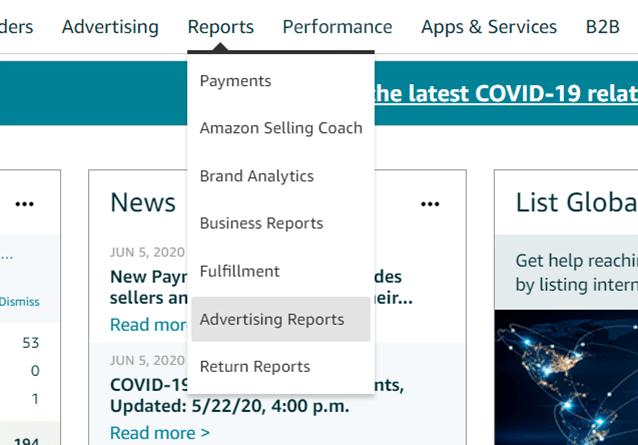
– Sign in to your Amazon Seller Central account and navigate to the Reports section.
Step 2
– Open Advertising Reports and select the option to Create Report.
Step 3
– From the available campaign options, choose Sponsored Products.
Step 4
– Select Search Term as the report type, choose the required date range, and click Run Report.
Once the report has been generated, you can download and analyze the data to identify valuable search terms and opportunities for campaign optimization.
How to Analyze the Amazon Search Terms Report?
The primary purpose of the Search Terms Report is to help you identify relevant customer search queries that are generating impressions, clicks, and sales. Instead of relying only on assumptions about which keywords shoppers may use, you can use real advertising data to make more informed PPC decisions.
Analyzing this data allows you to identify high-performing search terms and incorporate them into your campaign structure. At the same time, you can find irrelevant or underperforming queries and use negative targeting to prevent unnecessary advertising costs.
The Search Terms Report can provide information such as:
- Campaign Name
- Ad Group Name
- Portfolio Name
- Keyword Match Type
- Customer Search Terms
- Impressions
- Clicks
- CTR (Click-Through Rate)
- CPC (Cost Per Click)
- Amount Spent
- Total ACoS (Advertising Cost of Sales)
- Total ROAS (Return on Ad Spend)
- Total Sales
- Conversion Rate
Pro Tip: Organizing campaigns into relevant portfolios can make PPC management easier, especially when you have a large number of products and campaigns. You can also structure campaigns and ad groups based on product categories, features, variations, or other relevant characteristics.

How to Use Amazon Search Terms Effectively?
Optimize Existing PPC Campaigns
You need enough historical data before making major keyword decisions. Reviewing at least 7 days of Search Terms Report data can provide a useful starting point, although longer periods may provide more reliable insights depending on your campaign’s traffic and sales volume.
Start by identifying relevant search terms that are generating sales and maintaining strong conversion rates. These terms can be added to your existing campaigns and targeted more intentionally. At the same time, look for irrelevant search queries or terms that generate clicks without producing conversions. These can be added to your negative keyword list to minimize wasted advertising spend.
When evaluating performance, pay close attention to important metrics such as sales, clicks, CTR, orders, and conversion rate. Looking at these metrics together provides a clearer picture of whether a search term is actually contributing to your campaign goals.
With proper campaign segmentation and search-term analysis, you can also identify ad groups that are receiving impressions and clicks but failing to generate orders. Depending on the amount of data available, these keywords or ad groups can be optimized, adjusted, or paused.
Pro Tip: Regular PPC audits can help you identify inefficient spending, weak targeting, and opportunities for improving campaign performance. Reviewing your Search Terms Report as part of your regular PPC optimization routine can help you make more informed advertising decisions.
Create Manual Campaigns
Search-term data from Amazon’s automatic campaigns can be extremely useful when building manual campaigns. Automatic campaigns allow Amazon to discover relevant search queries based on your product information, and the resulting data can help you identify keywords worth targeting manually.
Ideally, review several weeks of data before making major decisions, with a month of data often providing more useful insights when sufficient traffic is available. Look for search terms that have generated sales and identify them using metrics such as total sales, orders, and conversion rate.
Once you identify strong-performing search terms, you can add them to manual campaigns and give them more control through appropriate keyword targeting and bidding strategies.
Previously, Amazon’s Search Terms Report provided more detailed SKU-level information for associating search activity with individual products. Since that information is no longer available in the same way, campaign structure becomes even more important.
For this reason, using one SKU per ad group can make performance analysis easier. When each ad group contains a single SKU, it becomes simpler to determine which product is benefiting from a particular search term.
On the other hand, placing multiple SKUs within the same ad group can make attribution more difficult. If a search term generates a conversion, it may be harder to determine which specific product contributed to that result.
Monitor Consumer Trends and Search Behavior
Regularly analyzing the Search Terms Report can help sellers understand changing customer interests and purchasing behavior. Amazon shoppers may use different search phrases over time, particularly as seasons, trends, competitors, and product preferences change.
One useful approach is to filter the report based on total ad spend. This can help you quickly identify search terms that are consuming a significant portion of your advertising budget.
Pay particular attention to keywords that receive substantial clicks and spend but fail to generate sales. Depending on their performance and relevance, you can reduce bids, adjust targeting, or pause these keywords to prevent continued inefficient spending.
You should also examine search terms that are generating both sales and conversions. These terms can represent valuable opportunities for increasing bids, expanding keyword targeting, or creating dedicated campaigns.
By consistently reviewing spending and conversion data, you can allocate more of your advertising budget toward search terms that are producing profitable results. This can help improve overall campaign efficiency, control ACoS, and increase the return generated from your PPC investment.
Optimize Your Product Listings for Relevant Search Terms
Search-term performance can also provide valuable insights for optimizing your Amazon product listings. Amazon evaluates the relevance of your product information when determining which products should appear for particular customer searches.
If you are aggressively bidding on a keyword but your product is receiving very few or no impressions, the problem may not always be your bid. Your listing may lack sufficient relevance for that search term.
Use relevant search queries discovered through your advertising data to identify potential listing optimization opportunities. Where appropriate, incorporate relevant terms naturally into your product title, bullet points, product description, and other relevant listing content.
However, avoid unnecessarily repeating keywords or adding irrelevant search terms simply to increase keyword coverage. Your listing should remain natural, useful, and focused on explaining the product’s features, benefits, applications, and value to customers.
Optimize Amazon Backend Search Terms
Backend search terms can also contribute to your product’s discoverability on Amazon. These hidden keywords provide additional opportunities to communicate relevant search terms to Amazon without placing them directly in the visible portion of your listing.
The Search Terms Report can help you discover customer queries that may be relevant to your product but are not currently incorporated into your listing’s keyword strategy.
Review your search-term data and identify relevant variations, phrases, and customer language that could strengthen your backend keyword strategy. Use these terms appropriately while following Amazon’s current character limits and search-term guidelines.
A well-optimized backend keyword strategy, combined with strong visible listing content and relevant PPC targeting, can help improve the overall relevance of your product for valuable customer searches.
Conclusion
The Amazon Sponsored Products Search Terms Report provides valuable historical data about the actual search queries shoppers use when discovering products through advertising.
Rather than relying entirely on keyword assumptions, sellers can use this information to understand customer search behavior, identify high-performing terms, eliminate wasteful targeting, and improve campaign structure.
The insights from the report can also be used beyond PPC campaigns. Relevant search terms can help guide product listing optimization, manual campaign creation, negative keyword targeting, and backend search-term optimization.
By reviewing the Search Terms Report consistently and making data-driven adjustments, Amazon sellers can improve keyword relevance, control advertising costs, increase campaign efficiency, and create stronger opportunities for product visibility and sales.