
If you sell products on Amazon, there may come a point when you need to deal with excess inventory. Clearing unwanted or slow-moving stock is a normal part of retail, but managing the process can become complicated, costly, and time-consuming.
Whether you operate as an FBM or FBA seller, keeping too much inventory can create serious problems for your business. Unsold products tie up your cash, consume valuable storage space, increase operating expenses, and make it harder to invest in products that could generate stronger returns. The longer excess stock remains unsold, the more expensive it can become.
There is no universal strategy for liquidating Amazon inventory. The best approach depends on the type of product, its demand, your profit margins, and how quickly you need to free up capital.
If your Amazon business is dealing with slow-moving products or stock that is no longer generating sales, it is important to understand the different ways you can clear that inventory.
This guide explores the main situations that may lead to liquidation, alternatives worth trying first, and several practical ways to get rid of excess Amazon inventory.
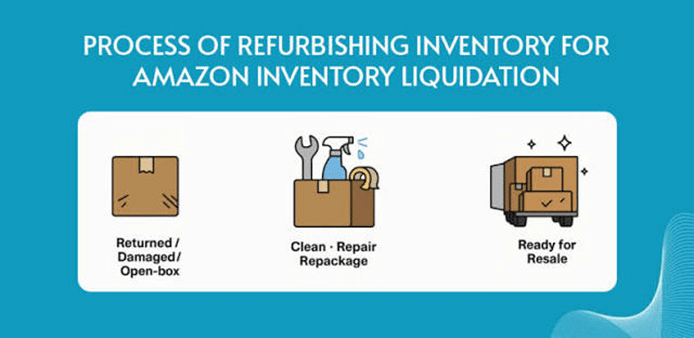
When Should You Consider Liquidating Inventory?
Liquidation can provide several advantages, but deciding when to take action is equally important. You should ideally begin clearing excess inventory before it creates significant financial pressure for your business.
Two common situations usually signal that it may be time to liquidate your stock.
1. Dead Inventory: Products That No Longer Sell
Dead inventory refers to products that have stopped generating meaningful sales. This situation can happen for several reasons, including weak product research, inaccurate demand forecasting, declining customer interest, product issues, or ineffective inventory planning.
Most products have a limited sales lifecycle, and demand can naturally decline over time. Holding on to products that consistently fail to sell can therefore turn a temporary sales problem into a long-term financial burden.
Instead of allowing these items to occupy storage space indefinitely, sellers should evaluate clearance and liquidation options before their value declines further.
2. Rising Storage Costs
Another major warning sign is the increasing cost of keeping unsold products in an Amazon fulfillment center.
FBA can be highly convenient when products are selling consistently, but slow-moving inventory can become expensive to maintain. Storage charges continue to affect your profitability while your products sit in the warehouse without generating sufficient revenue.
When inventory has remained unsold for too long, removing it from Amazon may be a smarter option. Once you have control over the stock, you can explore alternative ways to sell, discount, donate, or liquidate it.
Are There Better Alternatives to Liquidating Excess Inventory?
Having excess Amazon inventory does not automatically mean that immediate liquidation is your only choice.
In many cases, liquidation should be considered after you have tried other methods to improve sales and move your stock. Before making a final decision, review the following factors.
- Could timing be affecting demand? Seasonal items such as winter clothing, holiday decorations, or other occasion-specific products may naturally experience slower sales outside their peak period. In such cases, keeping the inventory until the next selling season may make more sense than selling it at a steep discount.
- Is your Amazon account performing well? A weak account history, low customer trust, or an insufficient number of positive reviews can make it harder for a product to gain sales. Improving customer experience and strengthening your social proof may help increase demand.
- Is your listing properly optimized? Products that do not appear prominently in Amazon search results may struggle to attract buyers. Review your titles, bullet points, descriptions, backend terms, images, and keyword targeting to make sure your listing is optimized for relevant searches.
- Is your pricing competitive? Customers compare prices across competing products, and an overpriced listing can quickly lose sales. Review the market and adjust your pricing strategy where necessary.
After evaluating these areas, you may discover that your inventory can still be sold with better optimization, pricing, promotion, or timing.
However, if you have already tried these approaches and the products remain difficult to sell, liquidation may become the more practical option.
Benefits of Liquidating Excess Inventory
For FBA sellers, one of the biggest advantages of liquidating excess inventory is the ability to reduce unnecessary storage expenses.
Removing products that are no longer generating enough sales can also improve cash flow and reduce the financial pressure associated with holding unwanted stock.
Clearing excess inventory also creates room for newer products with better sales potential. Instead of dedicating warehouse capacity and capital to slow-moving products, sellers can redirect those resources toward products that are more likely to contribute to business growth.
What Is Amazon FBA Liquidation?
Amazon FBA Liquidations is a program designed to help sellers dispose of eligible unsold inventory by connecting excess stock with liquidation buyers.
The program has been available to eligible sellers using the Amazon U.S. marketplace, including certain sellers located outside the United States who sell through that marketplace.
Rather than paying the full cost of removing or disposing of inventory, sellers can use the liquidation process to recover a portion of the value of eligible products.
How Does the FBA Liquidation Program Work?
Through the liquidation process, Amazon works with liquidation companies that purchase eligible excess inventory.
Sellers can submit qualifying products for liquidation, and the inventory is then sold to a liquidation buyer at a reduced value. The seller receives a recovery amount after applicable fees and deductions are taken into account.
The recovery value is influenced by several factors, including:
- Overall product sales performance
- Historical sales of the specific ASIN
- Average selling price of the product
Liquidation buyers generally purchase products at a significant discount compared with their original Amazon selling price. Amazon then deducts applicable fees before crediting the remaining recovery amount to the seller.
How Much Money Can You Recover?
There is no fixed recovery amount for every product submitted for liquidation.
The amount you receive depends on factors such as the product’s historical selling performance, average selling price, condition, and the terms of the liquidation process.
In many cases, sellers recover only a small percentage of the product’s original selling price, so liquidation should generally be viewed as a way to recover part of the investment rather than maximize profit.
Is FBA Liquidation Available to Non-U.S. Sellers?
Eligible non-U.S. sellers may also be able to use the liquidation program when selling products through the Amazon U.S. marketplace, subject to Amazon’s current eligibility requirements.
Availability can depend on marketplace, seller account, inventory, and program eligibility.
Who Are Amazon’s Liquidation Buyers?
Amazon works with wholesale liquidation companies that purchase products from the liquidation channel and resell them through downstream sales channels.
These buyers operate under contractual restrictions, including limitations on reselling certain liquidated products directly through Amazon.
Can a Liquidation Order Be Canceled?
Depending on the stage of the liquidation process, sellers may be able to cancel a liquidation request.
When cancellation is allowed, the affected inventory can be returned to the seller’s available inventory or otherwise handled according to Amazon’s removal process.
Fees Charged Through Amazon FBA Liquidation
Amazon applies fees to the liquidation process, which can include processing charges and applicable referral or selling-related fees depending on the product.
Because fee structures can change over time, sellers should always review the latest fee information available in Seller Central before submitting a liquidation order.
Understanding these costs is important because they directly affect the amount you ultimately recover from your excess stock.
How to Create an FBA Liquidation Order
Eligible sellers can initiate the liquidation process through Amazon Seller Central by using the inventory management and removal tools.
1. Create a Removal Order
From your inventory planning section, select the ASINs you want to remove and choose the option to create a removal order.
You may also be able to begin the process through Amazon’s recommended removal or inventory management reports.
2. Select Liquidation
Choose the liquidation option and enter the quantity of inventory you want to liquidate.
If you have multiple eligible products, you may also be able to process several items in the same workflow.
3. Review and Confirm
Before submitting the request, carefully review the selected products, quantities, fees, and other details.
Once everything looks correct, confirm the liquidation order.
Other Ways to Liquidate Excess Amazon Inventory
Amazon’s liquidation program is not your only option. Depending on your product and business model, there may be other strategies that allow you to recover more value from unwanted stock.
Run a Giveaway or Promotional Campaign
Before sending your products into liquidation, consider using a final promotional campaign to increase sales.
A giveaway, discount campaign, coupon, or limited-time promotion can create urgency and encourage buyers to purchase products that have been sitting in inventory.
Even when your primary objective is to clear stock, a promotion can also increase brand awareness and introduce your products to a larger audience.
Sell Through Other Marketplaces
A product that performs poorly on Amazon may still have potential on another platform.
You can consider moving your inventory to marketplaces such as eBay, Walmart, Shopify, Facebook Marketplace, or other sales channels that are relevant to your target customers.
For this approach, you will first need to remove the inventory from Amazon’s fulfillment network and arrange delivery to your own warehouse, third-party logistics provider, or another selling destination.
Social commerce can also provide additional opportunities, particularly through channels such as Facebook Marketplace and Instagram Shopping.
Sell the Inventory to Competitors
Another option is to approach businesses operating in the same product category.
While selling inventory to a competitor may not always be easy, it can be a useful strategy when another seller is already familiar with the product and has an established customer base.
Products with broad demand, generic packaging, or minimal branding may be easier to transfer to another seller.
Successful negotiations will depend on factors such as inventory quantity, product condition, market demand, and your cost basis.
Try to negotiate a price that allows you to recover as much of your original investment as possible while accounting for the costs associated with removing and transporting the inventory.
Donate Excess Inventory to Charity
Selling your inventory is not the only way to put unwanted products to good use.
Depending on the type of products you sell, donating excess inventory to charitable organizations can be another solution.
Although donations may not provide the same immediate financial return as a sale, they allow useful products to reach people or organizations that need them instead of being discarded.
Amazon has also supported donation-related initiatives aimed at redirecting eligible excess and returned products toward charitable organizations.
Sellers should still review any applicable removal, transportation, or processing charges before choosing this route.
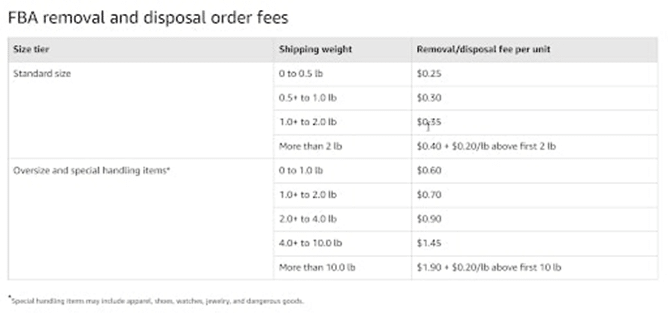
FBA Liquidations and Amazon Inventory Performance
Inventory levels can influence your overall inventory health and performance metrics on Amazon.
Keeping excessive quantities of products that do not sell efficiently can create additional pressure on your inventory management. Removing obsolete or unwanted stock may help you maintain a healthier inventory position and make room for products with stronger demand.
A well-planned inventory management strategy can also help you identify slow-moving products earlier, allowing you to take action before storage costs and declining demand turn them into dead stock.
Using inventory forecasting, sales data, reorder alerts, and sell-through analysis can make it easier to maintain a balanced stock level and reduce the chances of future overstocking.
Final Thoughts
Almost every retail business eventually faces the challenge of excess inventory. Products can become slow-moving because of changing customer preferences, inaccurate forecasts, increased competition, seasonal demand, or other market conditions.
The important thing is to recognize the problem early.
Before liquidating your Amazon inventory, review your pricing, listing optimization, product demand, seasonality, and promotional opportunities. If those strategies do not generate enough sales, liquidation may be a sensible way to free up storage capacity and recover at least part of your investment.
Excess inventory does not necessarily mean your business is failing. In many cases, it is simply a signal that your inventory strategy needs to evolve.
By monitoring stock levels carefully and acting early, you can reduce unnecessary costs, improve cash flow, and make room for products with stronger growth potential.