Amazon offers an extensive marketplace where sellers can find opportunities across thousands of product categories. However, not every product is immediately available for sale. To maintain customer trust, product safety, and marketplace standards, Amazon places certain categories, brands, and individual products behind approval requirements.
These are commonly known as restricted or gated categories. Sellers must obtain permission from Amazon before listing products that fall under these restrictions. Depending on the product type, marketplace, and applicable regulations, the approval process may involve submitting supplier invoices, product information, safety certificates, and other supporting documents.
So, which categories require approval, and what steps should sellers follow to get ungated on Amazon? This guide explains the essential requirements, application process, and practical strategies to help sellers access restricted product categories.
Understanding Amazon Restricted Categories
Amazon restricts specific product categories to ensure that everything sold through its marketplace meets its quality, safety, and authenticity standards. Sellers who want to enter these categories must first satisfy Amazon’s eligibility requirements.
The restrictions can vary depending on the marketplace and local regulations. For example, the requirements for selling in the United States may differ from those in the United Kingdom or European marketplaces.
For this guide, we’ll primarily focus on Amazon US, although many of the general approval procedures also apply to other marketplaces.
Some categories and product types that may require approval in the United States include:
- Holiday Selling Requirements in Toys & Games
- Watches and Collectible Coins
- Video, DVD, and Blu-ray
- Music and Streaming Media Players
- Grocery & Gourmet Foods
- Beauty and Topical Products
- Sports and Nutrition
- Gardening and Watering Equipment
- Automotive Products
- Over-the-Counter (OTC) Medication
- Haircare and Beauty Appliances
- Baby Topical Products
- Toys and Pet Supplies
- Medical Supplies and Equipment
- Pet Food and Pet Care Products
- Candles and Aromatherapy Products
- Power Tools
- Home Environment Electronics
- Wireless Accessories
- Baby Feeding Products
- Feminine Hygiene Products
- Baby Activity Gear
- Baby Strollers and Carriers
- Audio-Visual Equipment
- Personal Safety and Household Products
Important: Amazon regularly reviews and updates its category restrictions. A product that requires approval today may have different eligibility requirements in the future. Always verify the latest requirements through Seller Central before sourcing inventory.
Restricted Products on Amazon
Category-level restrictions are only one part of Amazon’s selling policies. Certain individual products may also require additional authorization, even when the broader category is available to sellers.
Some products are subject to additional documentation, regulatory compliance, or safety checks. Others may be completely prohibited from being listed.
Examples of product types that can face selling restrictions include:
- Alcohol and Animal-Related Products
- Fine Art and Home Décor
- Automotive and Powersports Products
- Composite Wood Products
- Cosmetics and Skin or Hair Care Products
- COVID-19 Supplies
- Currency, Coins, and Gift Cards
- Dietary Supplements
- Drugs and Drug Paraphernalia
- Electronics
- Explosives, Weapons, and Related Items
- Export-Controlled Products
- Food and Beverages
- Gambling and Lottery Products
- Hazardous and Dangerous Goods
- Human Parts and Burial Artifacts
- Jewelry and Precious Gems
- Laser Products
- Lighting Equipment
- Lock Picking and Theft Devices
- Medical Devices and Accessories
- Offensive and Controversial Materials
- Pesticides and Pesticide Devices
- Plants and Seeds
- Postage Meters and Stamps
- Recalled Products
- Electronic Recycling Products
- Subscriptions and Periodicals
- Surveillance Equipment
- Tobacco and Related Products
- Warranties, Service Plans, and Guarantees
- Refrigerants and Ozone-Depleting Substances
- Upholstered Furniture and Bedding
- CPAP Cleaning and Disinfecting Devices
This is not an exhaustive list. Restrictions can change based on Amazon’s policies, product characteristics, and applicable laws.
Sellers should regularly review the restricted products policies in Seller Central to avoid accidentally listing prohibited or unauthorized inventory.
Brand Restrictions on Amazon
Apart from category and product restrictions, Amazon also applies selling limitations to specific brands.
Well-known brands such as Nike, Adidas, and Gucci may have additional authorization requirements. These restrictions are generally intended to protect intellectual property rights, prevent counterfeit products, and ensure that customers receive authentic merchandise.
Before sourcing branded inventory, sellers should confirm that they have the necessary authorization and documentation to sell those products.
If you’re planning to expand your branded product catalog, SAECOM FBA PRO’s Amazon account management services can help you manage product listings, monitor account compliance, and organize your selling operations.
Product Condition Restrictions
Amazon also regulates the condition in which certain products can be sold. Some categories have additional limitations on used, refurbished, or collectible inventory.
Examples of categories that may have restrictions on used-product listings include:
- Baby Products
- Beauty, Clothing, Accessories, and Luggage
- Grocery & Gourmet Food
- Health & Personal Care
- Jewelry, Shoes, Handbags, and Sunglasses
- Watches
These requirements help maintain customer confidence and ensure that products meet the expected quality standards.
Before listing used or refurbished products, sellers should review the applicable condition guidelines and confirm that their inventory meets Amazon’s requirements.
Is Selling in Restricted Amazon Categories Worth It?
Amazon provides sellers with access to a massive customer base, making it an attractive platform for businesses looking to expand their online sales. However, entering restricted categories requires additional preparation and compliance.
So, why should sellers consider these categories in the first place?
One potential advantage is reduced competition. Since restricted categories require additional documentation and approval, some sellers choose to avoid the extra work involved. This can create opportunities for qualified sellers who are willing to complete the approval process.
Other potential benefits include:
Access to Additional Product Opportunities: Getting approval allows sellers to explore product segments that may not be available to every marketplace participant.
Potential for Better Market Positioning: Fewer eligible sellers can sometimes create opportunities to establish a stronger presence within a particular niche.
Business Expansion: Entering additional categories allows sellers to diversify their product portfolios instead of relying on a limited selection of products.
Long-Term Growth Opportunities: Building experience with Amazon’s approval procedures and compliance requirements can make future category expansion easier to manage.
However, restricted categories do not automatically guarantee higher profits or lower competition. Sellers should evaluate product demand, sourcing costs, fees, and compliance requirements before investing in inventory.
Getting Started With Amazon Restricted Category Approval
Before submitting an application, sellers should understand that every restricted category and product may have its own approval criteria.
Although the exact requirements differ, there are several important areas that Amazon may evaluate during the application process.
1. Maintain a Professional Selling Account
Some category and product approval applications require sellers to have a Professional selling account.
Amazon’s Professional plan includes additional selling tools, inventory management features, and advertising capabilities. It also involves a monthly subscription fee and applicable selling charges.
Having a Professional account does not automatically guarantee approval, but it may be necessary for certain selling privileges.
2. Maintain Strong Seller Performance Metrics
Your seller account’s performance history can influence your eligibility for restricted products.
Amazon evaluates several performance indicators to understand how reliably sellers handle orders, customer complaints, and fulfillment responsibilities.
Important metrics include:
- Order Defect Rate (ODR): Measures the percentage of orders that receive negative feedback, an A-to-z Guarantee claim, or a credit card chargeback.
- Pre-Fulfillment Cancellation Rate: Tracks orders canceled by sellers before shipment confirmation.
- Late Shipment Rate: Measures the percentage of seller-fulfilled orders shipped after the expected shipping date.
Historically, Amazon has used targets such as an ODR below 1%, a pre-fulfillment cancellation rate below 2.5%, and a late shipment rate below 4%. However, these figures should not be treated as universal approval requirements for every category.
Sellers should check their current Account Health dashboard and the specific eligibility criteria for their intended products.
For sellers who need assistance maintaining account performance, SAECOM FBA PRO’s Amazon account management services can support account monitoring, operational management, and policy compliance.
3. Provide Proof of Product Authenticity
Product authenticity is one of the most important considerations when applying for restricted category approval.
Amazon wants to ensure that products sold through its marketplace are genuine and sourced through legitimate supply chains.
Depending on the application, sellers may need to provide invoices or other documentation showing that their products were purchased directly from manufacturers or authorized distributors.
Make sure your supplier can provide verifiable business information and that the products you intend to sell meet Amazon’s authenticity requirements.
4. Prepare Acceptable Supplier Invoices
Supplier invoices are frequently requested during Amazon’s approval process.
However, simply uploading an invoice does not guarantee acceptance. The document must satisfy the requirements specified in the application.
Before submitting your invoice, check the following:
- The invoice should be genuine and issued by your supplier.
- The supplier’s business information should be clearly visible.
- Your business name and address should match your Seller Central account details.
- The product descriptions and quantities should be easy to identify.
- The invoice date should fall within the timeframe specified by Amazon.
- The supplier should be a legitimate and verifiable business.
Some applications request invoices issued within the previous 90 days, although the exact timeframe and quantity requirements can vary.
Avoid altering invoices or submitting fabricated documents. Inaccurate paperwork can result in application rejection and potentially create account compliance issues.
5. Maintain a Professional Business Website
A business website can help establish your company’s online presence and provide additional information about your operations.
Although a website is not a universal requirement for category approval, it can help demonstrate business legitimacy when Amazon requests supporting information.
Your website should ideally include:
- Company information and business details.
- Contact information.
- Product and service descriptions.
- Supplier or brand information, where relevant.
- Clear business policies.
A professional online presence can also support your broader Amazon business strategy and help build credibility with suppliers and potential customers.
How to Get Approval to Sell Restricted Products on Amazon
Once you’ve reviewed the requirements and prepared the necessary documentation, you can begin the application process through Amazon Seller Central.
Follow these steps to check whether a product requires approval and submit your request.
Step 1: Log In to Amazon Seller Central
Open your Amazon Seller Central account using your registered seller credentials.
Make sure you’re accessing the correct marketplace because approval requirements may differ between the US, UK, and other Amazon regions.
Step 2: Navigate to Add a Product
From the Seller Central dashboard, open the Inventory section and select Add a Product.
This section allows you to search for products already available in Amazon’s catalog or create new listings when permitted.
Step 3: Search for Your Intended Product
Enter the product name, ASIN, or relevant identifying information into the search bar.
Review the results carefully to locate the exact product you intend to sell.
Step 4: Check the Listing Restrictions
If the product requires additional authorization, Amazon may display a notification indicating that listing limitations apply.
Select the relevant restriction or eligibility link to review the requirements.
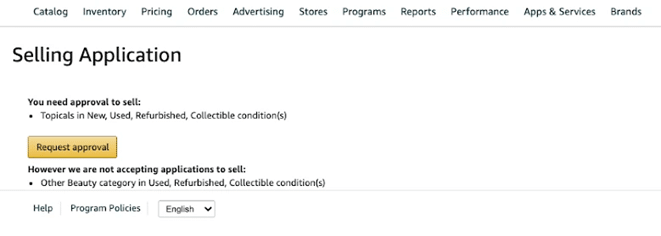
Step 5: Submit Your Approval Request
Click the Request Approval option if it is available.
Amazon will guide you through the application process and identify the documents or information required for that particular product.
Depending on the category, you may need to submit supplier invoices, product images, compliance certificates, or other supporting documentation.
Step 6: Monitor Your Application Status
After submitting your application, keep checking Seller Central for updates.
To review your application status, navigate to the relevant selling application status section within Seller Central.
Amazon may approve the request, reject it, or ask for additional documentation.
If your application is rejected, carefully review the reason before submitting another request. Correcting the actual documentation or eligibility issue is more effective than repeatedly sending the same application.
Amazon Category Approval Services: Should You Use an Ungating Service?
Some sellers prefer to manage the approval process independently, while others seek assistance from third-party Amazon ungating service providers.
These services generally help sellers understand category requirements, organize documentation, review invoices, and prepare applications.
However, it is important to understand that third-party ungating providers are not official Amazon approval authorities. They cannot guarantee that Amazon will accept an application or grant selling privileges.
If you’re struggling with the process, consider getting professional guidance before submitting your documents.
SAECOM FBA PRO offers Amazon-focused support to help sellers manage different aspects of their marketplace operations. From listing optimization and account management to policy consulting, professional assistance can help identify operational gaps and improve the overall quality of your selling strategy.
Explore our Amazon services to find support for your business requirements.
Practical Tips to Improve Your Chances of Amazon Category Approval
Submitting an application is relatively straightforward, but preparing a strong application requires attention to detail.
Here are some practical recommendations that can help sellers avoid common mistakes.
Build a Strong Seller Reputation
A well-maintained seller account can help demonstrate that your business understands Amazon’s marketplace requirements.
Focus on providing accurate product information, fulfilling orders on time, responding to customer concerns, and maintaining healthy account performance.
New sellers may need to establish a reliable selling history before pursuing more complex category approvals.
Starting with products that do not require additional authorization can help you become familiar with Amazon’s selling policies.
Choose Products With Verifiable Documentation
When preparing an approval application, prioritize products with clear sourcing records and legitimate supplier documentation.
Branded products may require additional authorization, and selecting a recognizable brand does not automatically improve your chances of approval.
The most important factor is whether your supplier and supporting documents satisfy Amazon’s requirements.
Verify Invoice Quantity Requirements
Some category applications specify a minimum purchase quantity.
Before purchasing inventory, review the exact application requirements to ensure that your invoice reflects the necessary quantity and product details.
Failing to meet these conditions can result in unnecessary expenses and application delays.
Purchase From Reliable Suppliers
Sourcing products directly from manufacturers or authorized distributors can make it easier to establish product authenticity.
Work with suppliers who provide legitimate invoices and can verify their business information when required.
Avoid suppliers who cannot provide proper documentation or whose inventory sources are unclear.
Research Products Before Purchasing Inventory
Never assume that a product is eligible for sale simply because it appears in Amazon’s catalog.
Before investing in inventory, check its category, brand restrictions, product-level requirements, and applicable compliance policies.
For sellers planning to expand their catalogs, SAECOM FBA PRO’s product sourcing and research support can help with evaluating product opportunities and building a more informed sourcing strategy.
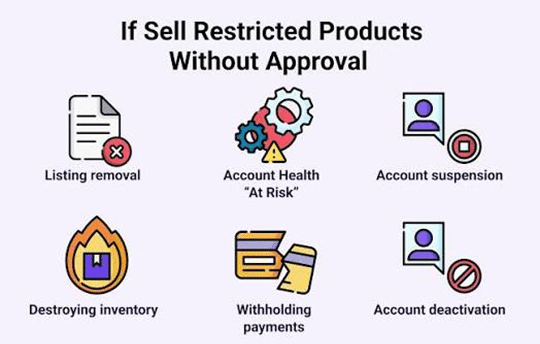
Understand the Consequences of Violating Amazon’s Policies
Listing restricted or prohibited products without the necessary authorization can create serious problems for your seller account.
Depending on the nature and severity of the violation, Amazon may take actions such as:
- Removing individual product listings.
- Restricting listing privileges.
- Suspending selling privileges.
- Requesting additional compliance documentation.
- Deactivating the seller account.
Reinstating an account after serious policy violations can be difficult and time-consuming.
FBA sellers should also pay close attention to product eligibility and dangerous goods requirements before shipping inventory to Amazon fulfillment centers. Non-compliant inventory may be rejected, removed, or disposed of according to Amazon’s applicable policies.
Category Approval Does Not Mean Unlimited Selling Permissions
One important detail that sellers should never overlook is that approval for a particular category does not automatically provide permission to sell every product within it.
For example, Amazon may allow a seller to list products in a broader category while maintaining separate restrictions on specific brands, subcategories, or individual ASINs.
Some products may also require additional safety certifications, regulatory documentation, or brand authorization.
Therefore, always check the individual product’s eligibility before purchasing inventory or creating a listing.
Final Thoughts
Getting approval to sell in restricted Amazon categories can require additional preparation, documentation, and patience. However, for sellers who meet the eligibility requirements, these categories can provide opportunities to diversify their product portfolios and explore new areas of the marketplace.
The key is to understand Amazon’s restrictions, maintain a healthy seller account, source authentic products, and submit accurate supporting documents.
Avoid rushing into restricted categories without researching their requirements. A well-planned approval process can help prevent unnecessary expenses, listing problems, and account health issues.
If managing category approvals, sourcing, account compliance, and listing operations becomes challenging, SAECOM FBA PRO can help you navigate your Amazon business more effectively.
From Amazon account management and listing optimization to product sourcing, reimbursement audits, and policy consulting, our services are designed to help sellers identify opportunities, improve operational efficiency, and build sustainable growth on Amazon.
Ready to take your Amazon business further? Connect with SAECOM FBA PRO and explore the services that can support your next stage of growth.